
• Hot Stories
    • Top Apps
    • Accessories
    • Wearables
  • iOS Apps
  • Robots & Drones
    • Smart Robots
    • Drones
  • Home Automation
  • Support
    • Partners

iPhoneNess

Covering everything iPhone

    • Trending

      All time

    • 20 Best Calendar Apps for iPhone + Videos

      191 Comments

    • 10+ Best iPhone GPS Apps for Car Drivers

      77 Comments

    • Latest Stories

      What is new?

    • accrosoo F94 iPad Keyboard Case with 4-in-1 Hub

      December 4, 2025

    • LIFEHACKR Smart Water Bottle with MagSafe Mount

      December 4, 2025

    • Comments

      Most Recent

    • Cyrus on:

      Chargerito: Smallest Phone Charger?

    • chargerito on:

      Chargerito: Smallest Phone Charger?

  • Trends
    • 25+ iPhone Compatible Fitness Equipment
    • 30+ Flexible iPhone Mounts & Stands
    • 12 Stylish iPhone Purses & Bags
    • 15+ Awesome Solar Chargers for iPhone
    • 45+ Amazon Alexa-Enabled Smart Home Devices for iOS Users
    • 15 iPhone Garage Door Openers You Should See
    • 35+ Must See Augmented Reality Toys & Gadgets
    • 25+ Star Wars Gadgets & Gizmos for iPhone & iPad Fans
    • 40+ Awesome iPhone Compatible Robots for Kids
    • 15 iPhone Mounts & Accessories for GoPro Users
  • News
    • Guides
    • Cool Items
    • iPhone 5S
    • iWatch
    • iPad 5
    • iPad Mini
    • Kickstarter
  • iOS Apps
    • iPhone Apps
    • iPad Apps
    • Jailbreak
  • Tools
    • Alarm Clocks
    • Board Games
    • Calendars
    • Fitness Apps
    • GPS & Navigation
      • Outdoors
    • iOS Astronomy
  • Accessories
    • iPhone Add-ons
    • iPad Add-ons
  • Disclaimer
  • Contact

Persisch: How To Type Persian / Arabic on iPad

8
  • by Ci
  • in iPad Apps
  • — 27 Jun

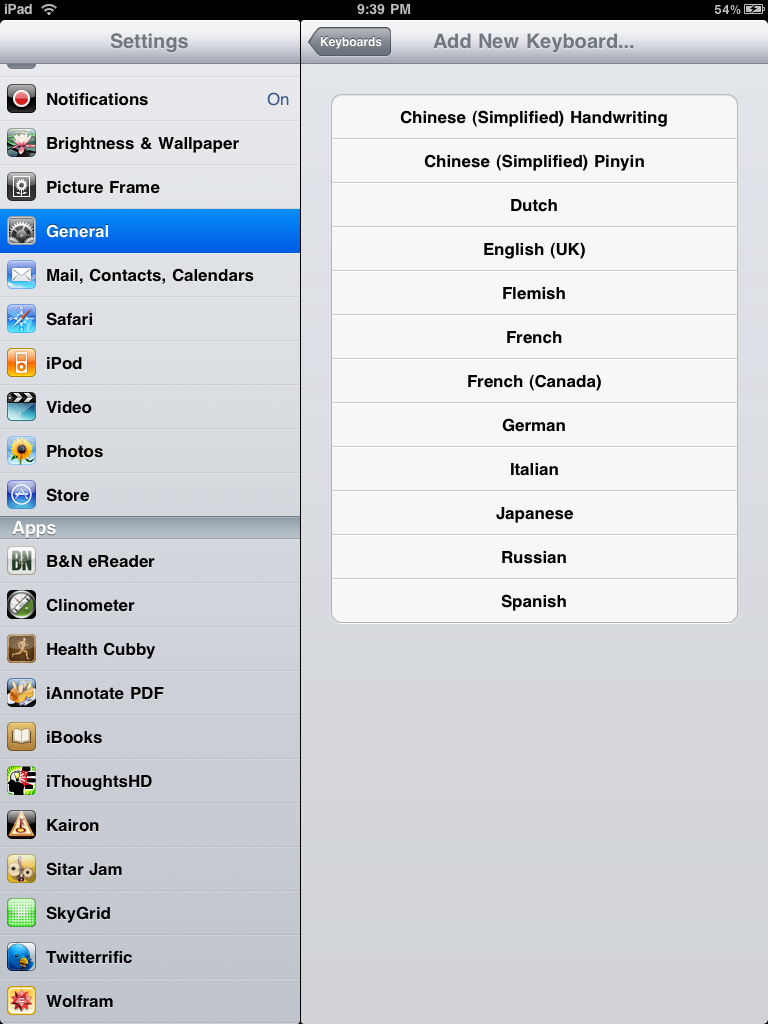
From time to time, we get e-mails from our readers about some of the issues they have experienced with their Apple gadgets. Some issues can be solved easily while others do need more complicated workarounds. Adding Persian/Arabic language support to iPad is one of those issues. Unfortunately, Apple iPad does not come with a keyboard for Middle Eastern languages. Those of you who speak those languages and want to take notes or search using your native language are almost out of luck. But there is an app for everything. Let’s remember that. Persisch is a handy iPad app that adds a Persian/Arabic keyboard to your iPad, giving you the opportunity to write in your favorite foreign language and share your words with your others.
Check out these uniquely awesome ✔️ iPhone gadgets & gizmos

Persisch does not turn your existing virtual keyword to a Persian one. It does add a new keyboard that you can use to type what you need in your language. When you start Persisch, you are going to get a virtual mini notepad and a Persian/Arabic keyboard. These two languages do have a lot in common, but there are a few differences between them as well. Fear not. You can switch between Arabic and Persian on your iPad by tapping on the keyboard button.
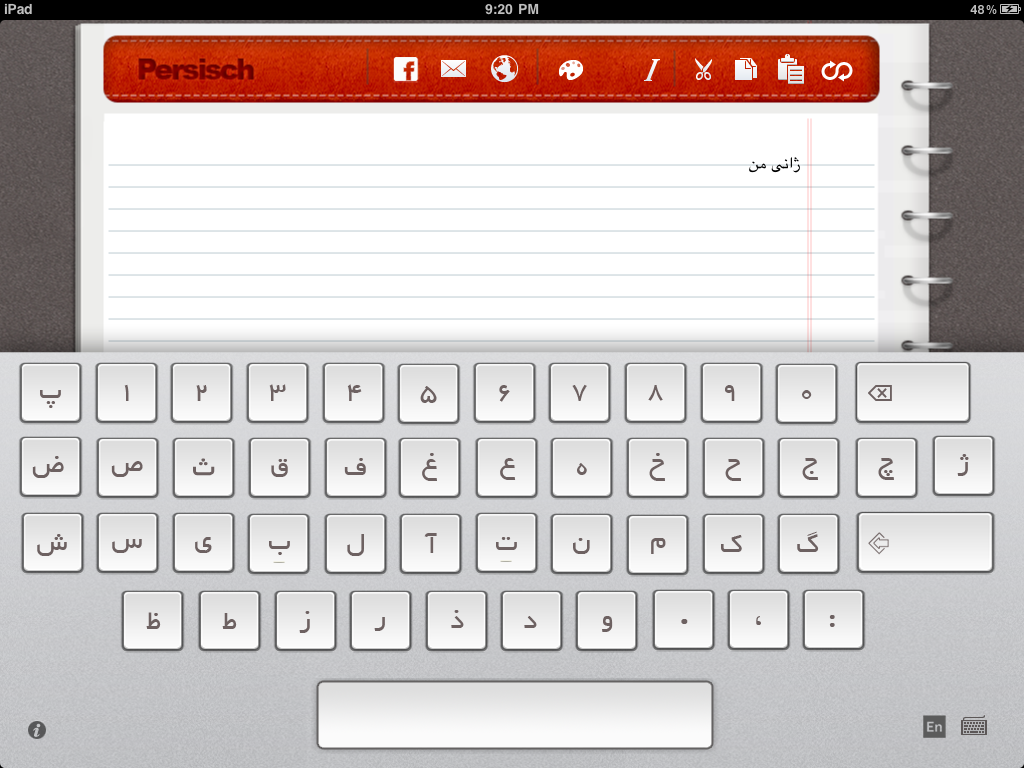
Having tried a few Persian software programs in the past, I can tell you that while a lot of them promise a lot of things, not too many of them deliver in the end. There are a ton of these apps that do not connect Persian or Arabic letters properly. That’s not the case with this app. Besides, you can type all your want and copy/past your content to other locations when you are done (or send it to others via e-mail).
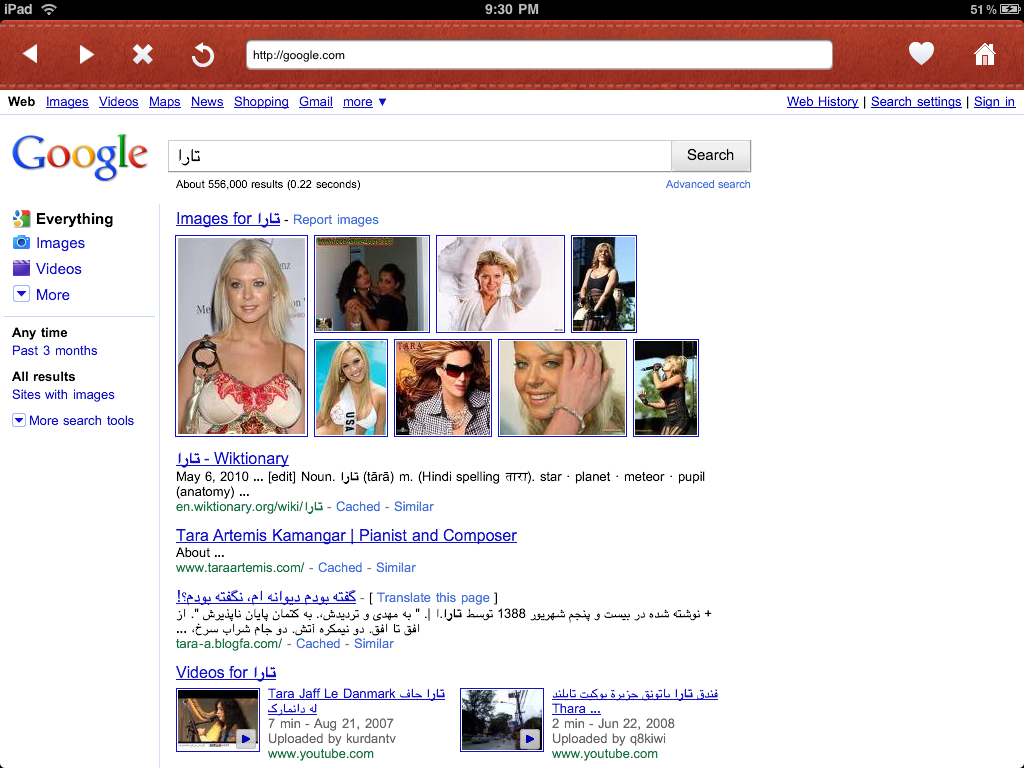
Persisch not only lets you type in Persian on your iPad, it also enables you to browse the web and enter Persian words onto your favorite websites (or Google search). As you can see in the above screen-shot, I managed to search for the Persian equivalent of the word “tara” on my iPad using this app. The sky’s the limit here. For example, you can copy/past your Persian or Arabic words to Facebook or other top websites.

Also check out:
  • Move It: Smart Connected Personal Gym

The interface is very intuitive and the app delivers what it promises. It’d been nice if Apple was kind enough to offer support for all languages on iPad. Arabic and Persian languages are spoken by millions of people around the world. I am sure Apple may add support for these languages in the future. But who needs Apple when you have creative developers such as the ones behind Persisch.


**Disclaimer: Our articles may contain aff links. As an Amazon Associate we earn from qualifying purchases. Please read our disclaimer on how we fund this site.


Currently trending posts:

  • 6 Ways To Learn French On iPhone (or iPad)
  • 5 Cool Visual Dictionary Apps for iPhone & iPad
  • Learn Languages from Native Speakers: 5 iOS Apps
  • Bill Gates Not a Fan of iPad?
  • 6 Cool ASL Sign Language Apps for iPhone
  • iPad 5 To Get Surface Like Keyboard Cover?

You may want to see:

Tags: arabicfarsi


Add your reaction

8 Comments

  1. emad says:
    December 17 at 9:29 pm

    Thank u

    Reply
  2. hossein says:
    January 4 at 11:59 am

    thanks thanks thanks thanks 😀

    Reply
  3. Amin says:
    March 6 at 5:39 am

    thanks great article.

    Reply
  4. Mehdi says:
    October 31 at 11:46 am

    Hi I want keyboard Persian for Ipad in Iran

    Reply
  5. Bardia shery says:
    December 14 at 11:58 am

    This is the worst user interface I’ve ever seen. It’s waste of money. I guess the article has been writen by the developer himself to promote his software. If you don’t believe me, just waste your money and buy this software. Then try to switch between english and Persian keyboard. Then you will find out. But it’s too late. You have already lost your money.

    Reply
    • Cyrus says:
      December 14 at 3:34 pm

      Bardia, that is simply not true. But this article was written months ago. We review many products here and they change. I personally know this product has changed a lot since we tested it. I assure you, I am not the developer, don't know the developer, and have not done anything else with this developer. We just gave the app a mention when it was released a years ago.

      Reply
  6. Harika says:
    December 31 at 4:58 am

    It is nonesense. I need to use Farsi as a default keyboard of my iPad.

    Reply
  7. amir says:
    March 27 at 5:53 am

    it is funny, i boghu ipad but really i am regret, because i cant use persian language and i want to say to all people whos use persian language, maybe more than 150 m in the wirld, please dont bought it, because the apple company use the politic in thair prodacts, there are many language that maybe less than 5 m use it, i am sorry for apple.!!!

    Reply

Leave a Reply Cancel reply

Your email address will not be published. Required fields are marked *

  • Follow Us

    Facebooktwitterrssyoutube

  • Search & Subscribe

  • Trending Apps

    • Sync Fitbit to Health App & HealthKit
    • 6 Golden Hour Apps for iPhone
    • Learn About American Presidents with These 5 Apps
    • 50+ Best Augmented Reality iPhone Apps
    • 3 Suspension Trainers for iPhone
    • 7 Must See iPhone WOD Workout Generators
  • Current Visits:

    • 5 Must See Protective Apple Vision Pro Cases
    • 7 Must See Smartphone Controlled OpenCV Robots
    • 6 Must See iPhone 15 Filmmaking Cages & Rigs
  • Categories

    Admin AI Tools & Apps Apple Vision Pro Apps Apple Watch Accessories Commentary & Predictions Cool Finds DIY & Hacks Drones Events Giveaways Guest Posts Guides & Tools Home Automation Infographics iOS Security iPad accessories iPad Apps iPhone Accessories iPhone Apps iPhone Books iPhone Programming iPhone Thoughts iPhone Tips iPhotography Jailbreak Leaks Lists Mac Accessories News Reviews Smart Robots Uncategorized Videos Virtual Reality Wearables
  • Home
  • iPad Apps
  • Persisch: How To Type Persian / Arabic on iPad
  • Tags

    3d printer 4k ai alexa Android app app enabled Apple apple watch app lists augmented reality bluetooth camera case Charger coding drone fitness GPS home automation iOS iPad iPhone iphone 5 keyboard modular mower power bank python rig robot robotic security camera smart Smartphone smartwatch Solar speaker stand stem top accessories vision pro wearable wifi wireless charger
  • Current visits

    • Shark PowerDetect 2-in-1 Robot Vacuum & Mop
    • ThirdReality Zigbee Motion Sensor R1 for Home Automation
    • 4 Smart Wind Meters for Smartphones
    • Roku 4 for 4K Streaming + App
    • Sky-Watcher AZ-GTe Smartphone Controlled Telescope Mount
  • Search

  • Connect:

  •  

  • News
  • Partnerships
  • Our Reviews
  • Terms of Use
  • Privacy Policy
  • Takedown Requests
  • Support Us
  • RSS

© Copyright 2024 iPhoneness. EntropyGrid
iPhoneness is an independent website and has not been authorized, sponsored, or otherwise approved by Apple Inc. iPhone and iPhone 3G are among the trademarks or registered trademarks owned by or exclusively licensed to Apple Inc.
