Sep
11

10 Best To Do Applications for iPhone

18 comments

I know a lot of us use our phones to answer calls, play games, take videos, and so on. But iPhone can be a very powerful task manager as long as you have the right apps installed on your phone. Apple has been positioning iPhone and iPod Touch as a handheld computer, and it is absolutely the right call. So if you have a handheld pocket computer in your hands, why not use it to become more productive. If you have trouble keeping up with your tasks, here are 10 to-do iPhone apps you should try:
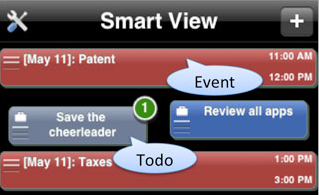
Smart Time: it’s a calendar and a killer to do list application for iPhone. This app is truly unique as it comes with a patent-pending solution that helps you organize your life more effectively.
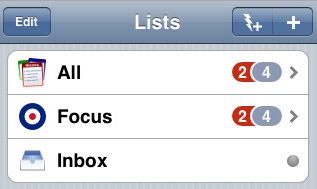
ToDo: a very straight forward to do application for iPhone that lets you manage your tasks and keep up with your projects. What I like about it is that it’s very simple to get a hang on.
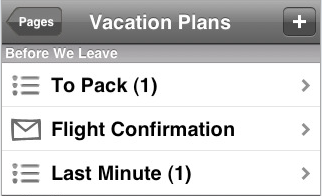
Satchel: a native client for Backpack that lets you manage all your tasks on your iPhone easily. It’s very powerful and while you’ll have to create an account online, the app offers a ton of features.
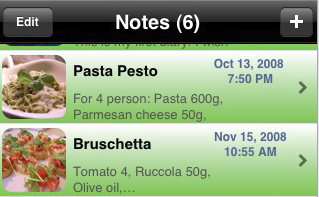
All in Notes: a multimedia to do list application for iPhone. So you are not just limited to text to do lists. You can also leave yourself with voice messages and so on.
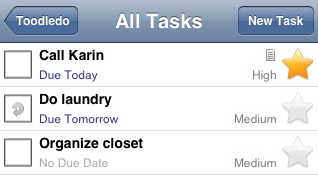
Toodledo: a very intuitive application for managing your tasks on iPhone. Very graphical and easy to follow. So you won’t lose track of your tasks no matter how many of them you have to deal with.
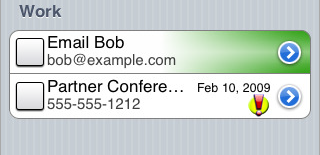
To-Do-List: as the name suggests, it’s a task management tool that lets you manage your lists easily on your Phone. Very different interface from the above apps, but easy to use at the same time. Audible alerts are a plus.
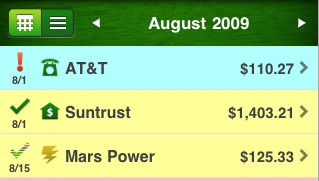
Bill Minder: a very cool to do application made specifically for your bills. So you won’t forget those bills and your credit won’t suffer because of it.
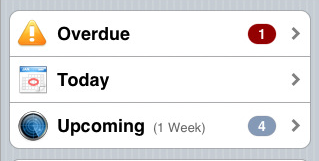
Nuvi Do: another simple task manager for iPhone that keeps track of your tasks and lets you know when you are being late for a specific task.
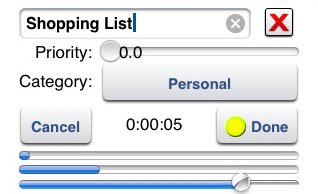
Voice Memo Recorder: who needs a task manager when you can record voice memos? You can do all kinds of things to your memos, including prioritizing them.
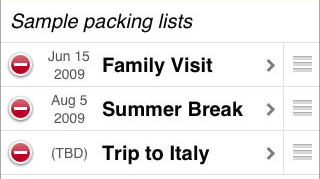
Packing: if you are planning to take a trip or go on a vacation, you are going to love this app. If you are anything like me and forget your adapters and other small items, this is a must have app.

10 cool applications that give you a hand with your tasks. If you want to stay organized and get things done on time, these apps come in handy.
People who visited this article also visited:

More iPhone posts:


*aff links used in some articles to fund our operations (disclosure page).

18 comments
  1. Hi, I use What Do I Need To-Do? It uses an Urgent V Important matrix, its quick and simple to use.

    April says...
    September 16th, 2009 at 11:02 am
  2. You may find some of the todo apps introduced here either too simple to be useful or too long-winded where it takes years to add tasks and appointments. You don't want your to-do app to actually take away your time that could have been spent actually getting things done.

    Why don't you try Todew – a task management app that won't waste your time?

    You can see the screencast here:http://somaticcontact.com/todew
    iTunes App Store link:http://bit.ly/dn2DBo

    Pete says...
    January 31st, 2010 at 10:03 am
  3. Great list and screenshots. I think you might also like my YouDo app. I’ll follow up with a promo code when the next update is approved (I have a couple codes for anyone reading this post also).

    Thanks.

    Steven says...
    February 2nd, 2010 at 2:19 pm
  4. If you're looking for simple and hate typing, then check out MyRoles for iPhone. QuickWords can be configured so that you type less and do more!
    http://www.myroles.ca

    aalittle says...
    September 6th, 2010 at 6:08 pm
  5. I spent months trying a bunch of different todo / task managers. Know what works best for me? TaskPaper. I use both the Mac and the iPhone version and they stay in sync. It lets me work the way I think. It's deceptively simple. It mostly stays out of my way, but what it does add is extremely useful and very powerful. Highly recommended.

    Ken says...
    September 30th, 2010 at 12:40 pm
  6. I must say the best todo app that works great for desktop and iphone is ListAppy Todo. Give it a try http://samurasolutions.com

    Kershaw says...
    October 12th, 2010 at 10:04 am
  7. Thanks for the recommendation! Got some good reviews and works best for me.

    Andrew says...
    October 14th, 2010 at 5:28 pm
  8. firs's called SmartTime 4, not smartview

    kaan says...
    November 3rd, 2010 at 4:53 am
  9. fixed. Though I am pretty sure it was called Smart View when we tested it.

    Cyrus says...
    November 3rd, 2010 at 5:37 am
  10. You should check out Intuition for Moms. It's a great to-do app designed for women! I love the colors and the built-in grocery list. It's also free which I like most of all! http://www.intuitionapp.com

    Karen says...
    November 16th, 2010 at 3:36 pm
  11. You forgot the best one, “Reminders!” it’s a supper simple and powerful app.
    this is the iTunes link http://itunes.apple.com/app/reminders-simple-todo

    SarahNyGirl says...
    November 29th, 2010 at 7:48 am
  12. Is there an iphone app that can sync with google calendar tasks?

    christian says...
    December 1st, 2010 at 10:22 am
  13. Great article on todo apps. Things has been my main general purpose todo app for some time.

    Yet, I had been searching for todo apps that would remind me of the items based on location.

    I was looking for a great location based reminder app.

    After being frustrated with the battery life impact of many of the current location reminder apps, I developed LocationMinder. It is optimized for iPhone 4 and uses a new technology that has extremely low battery usage.

    Here is a link to the iTunes App Store to check it out. http://bit.ly/90HZ4U

    I would appreciate any feedback or suggestions.

    Greg says...
    January 2nd, 2011 at 7:55 am
  14. Anyone know of an app that will kill running applications?

    raq says...
    March 3rd, 2011 at 12:11 am
  15. Thank you for this excellent list.
    There are a few good additional apps that have been released since this article.

    For example: Facetasks – a contact-centric task manager. Simple and neat.
    You keep track of your own todos but also your contact's
    (friends, family, colleagues, etc.).
    http://itunes.com/apps/mobilissimo/facetasks

    Enjoy-

    Helen says...
    March 13th, 2011 at 7:50 am
  16. I found gTasks which also has alerts and synchronizes tasks with google.
    I use it and I recommend! http://www.katans.com

    David says...
    April 28th, 2011 at 4:46 am
  17. Nicely done! Good app so far.

    amendus says...
    July 21st, 2011 at 5:00 pm
  18. Steps is missing from this list. It is probably the most innovative of all task manager apps out there. Steps is often overseen, because it did not receive reviews yet of the major blogs. But it's worth a look, it has a unique design approach. Check out http://stepboard.net and http://itunes.apple.com/us/app/steps./id505791739….

    Henning says...
    April 8th, 2012 at 11:23 am
Add a comment