• Hot Stories
    • Top Apps
    • Accessories
    • Wearables
  • iOS Apps
  • Robots & Drones
    • Smart Robots
    • Drones
  • Home Automation
  • Support
    • Partners

iPhoneNess

Covering everything iPhone

    • Trending

      All time

    • 20 Best Calendar Apps for iPhone + Videos

      191 Comments

    • 10+ Best iPhone GPS Apps for Car Drivers

      77 Comments

    • Latest Stories

      What is new?

    • Voltix 6th GaN 200W Travel Adapter with Display

      January 23, 2026

    • NEEWER 2X 240mm Telephoto Lens Converter for iPhone

      January 23, 2026

    • Comments

      Most Recent

    • Cyrus on:

      Chargerito: Smallest Phone Charger?

    • chargerito on:

      Chargerito: Smallest Phone Charger?

  • Trends
    • 25+ iPhone Compatible Fitness Equipment
    • 30+ Flexible iPhone Mounts & Stands
    • 12 Stylish iPhone Purses & Bags
    • 15+ Awesome Solar Chargers for iPhone
    • 45+ Amazon Alexa-Enabled Smart Home Devices for iOS Users
    • 15 iPhone Garage Door Openers You Should See
    • 35+ Must See Augmented Reality Toys & Gadgets
    • 25+ Star Wars Gadgets & Gizmos for iPhone & iPad Fans
    • 40+ Awesome iPhone Compatible Robots for Kids
    • 15 iPhone Mounts & Accessories for GoPro Users
  • News
    • Guides
    • Cool Items
    • iPhone 5S
    • iWatch
    • iPad 5
    • iPad Mini
    • Kickstarter
  • iOS Apps
    • iPhone Apps
    • iPad Apps
    • Jailbreak
  • Tools
    • Alarm Clocks
    • Board Games
    • Calendars
    • Fitness Apps
    • GPS & Navigation
      • Outdoors
    • iOS Astronomy
  • Accessories
    • iPhone Add-ons
    • iPad Add-ons
  • Disclaimer
  • Contact

8 Best e-Book Reader Apps for iPad

6
  • by Ci
  • in iPhone Apps
  • — 25 Apr

So you are a disgruntled Kindle owner, switching to iPad for all your e-book needs? The iPad can replace your Amazon Kindle, but it is not designed to be just an e-book reader. You are going to need to install a few apps on your device in order to get the best out of it. The iPad does support a few popular e-book formats, but there are always e-books that will need additional software for you to read them on your iPad.

Trending iPhone & iPad compatible gadgets:
  • 3 Steampunk Apple Watch Accessories

Whether you are looking to transform your iPad into your own dedicated e-book reader or just want to be able to read more types of documents on your device, these 8 iPad e-book apps are worth owning:
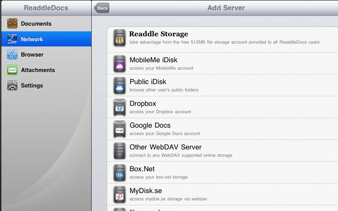
ReaddleDocs for iPad: a super useful app for iPad that makes it easy to read those large PDF files on your iPad. It also helps you transfer all your e-books to your iPad fast.
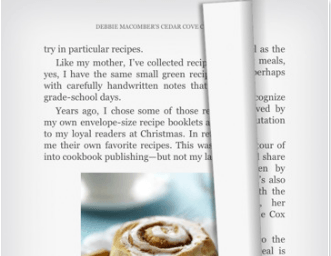
Kindle for iPad: what more can be said? Whether you are a Kindle owner making the switch to iPad or just want to buy book from Kindle store, this free app is a must have.
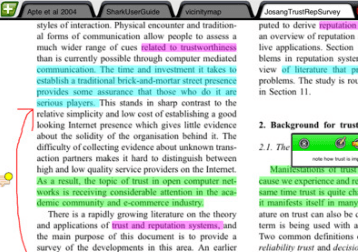
iAnnotate PDF: a super PDF reader for iPad that not only opens your PDF files but lets you annotate them as well. Great tool for those who like to take notes when reading books.
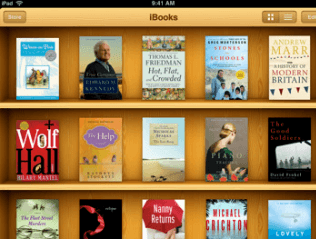
iBooks: Apple’s official e-book app for iPad. The app allows you to access Apple’s e-books and read your ePub books on your iPad. It’s free too.
Trending iPhone & iPad compatible gadgets:
  • 5 App-Enabled Soccer Balls & Sensors for Training Smarter

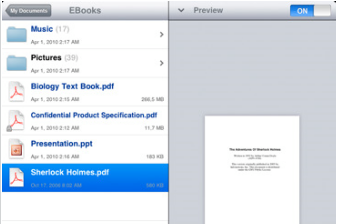
Good Reader for iPad: Good Reader for iPad is a wonderful PDF reader for iPad that handles the largest PDF files easily on your device. Can transfer your files to your iPad as well.
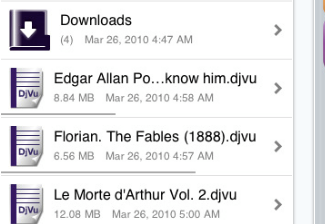
X Djvu for iPhone and iPad: I am not a big fan of Djvu files, but some reports and books are released in that format. This app can open those documents on your iPad.  Supports pdf, doc, xls, and txt documents as well.
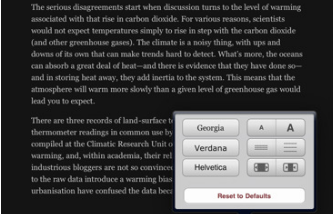
Instapaper Pro for iPad: not an e-book reader per se, but it can save web pages and blog posts for offline use. Works with magazines and all kinds of sites.
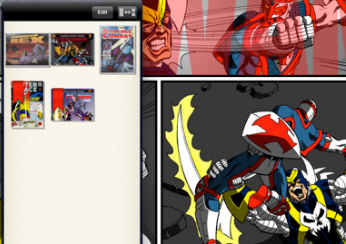
Comic Zeal Comic Reader: if you are into reading comic books on your iPad, this app is a must have. Your Kindle is certainly not capable of doing that.

Please feel free to add your favorite e-book reader apps for iPad below.

**Disclaimer: Our articles may contain aff links. As an Amazon Associate we earn from qualifying purchases. Please read our disclaimer on how we fund this site.


Currently trending posts:

  • Amazon Kindle for iPad In The Works?
  • 10 Best Document Reader Apps for iPhone
  • 5 Quality Manga Readers for iPhone / iPad
  • 5 Best PDF Readers for iPad You May Have Missed
  • 5 Best RSS Feed Apps for iPad
  • 5 Top Holy Book Apps for iPad

You may want to see:

  • 6 Must See Special Characters iPhone Apps
  • 5 Best Teleprompter Apps for iPad
  • 5 Gym Apps for Apple Watch
  • 24 Awesome Utilities for iPhone 24 Awesome Utilities for iPhone

Tags: app listsebooks


Add your reaction

6 Comments

  1. NewiPadOwner says:
    May 31 at 2:28 am

    If you are a Canadian, Kobo reader from Chapters/Indigo is great and the books are usually cheaper than the Kindle equivalents.

    Reply
  2. andreasduess says:
    June 24 at 1:02 pm

    Agreed, for us here in the north the Kobo reader is a great alternative. Books appear to be, on average, about two bucks cheaper than on the Kindle. What I do like about the Kindle is the synching ability, so if I am standing in line somewhere I can quickly read a couple of pages on my iPhone, when I get back to my iPad pick up where I left off.

    Reply
  3. Minnie Bhupathi says:
    August 27 at 6:44 pm

    Nook from barnes and Noble

    Reply
  4. Simone says:
    August 15 at 3:26 am

    I bought a book From a website and am trying to download it onto my ipad, but it wont let me, how do you do this?

    Reply
    • Cyrus says:
      August 15 at 11:23 am

      Could you please tell me where you bought it and what error you are seeing?

      Reply
  5. kkkk says:
    November 30 at 1:33 am

    xdjvu reader is not available in my country 🙁 . Any alternative?

    Reply

Leave a Reply Cancel reply

Your email address will not be published. Required fields are marked *

  • Follow Us

    Facebooktwitterrssyoutube

  • Search & Subscribe

  • Trending Apps

    • 5 iPhone Apps To Share Your Routes
    • 7 Must See Speed Reading iOS Apps
    • 5 Must See Mountain Biking Apps for iPhone
    • 7 iPhone Apps for Barbell Training
    • 2 iPhone Apps to Track Donations For Tax
    • 3 Foam Roller iPhone Apps for Post-workout Recovery
  • Current Visits:

    • 7 Must See Teleprompters for iPhone & Android Devices
    • 7 HomeKit Enabled Products For Your Smart Home
    • 5 Must See Cooling iPhone Stands
  • Categories

    Admin AI Tools & Apps Apple Vision Pro Apps Apple Watch Accessories Commentary & Predictions Cool Finds DIY & Hacks Drones Events Giveaways Guest Posts Guides & Tools Home Automation Infographics iOS Security iPad accessories iPad Apps iPhone Accessories iPhone Apps iPhone Books iPhone Programming iPhone Thoughts iPhone Tips iPhotography Jailbreak Leaks Lists Mac Accessories News Reviews Smart Robots Uncategorized Videos Virtual Reality Wearables
  • Home
  • iPhone Apps
  • 8 Best e-Book Reader Apps for iPad
  • Tags

    3d printer 4k ai alexa Android app app enabled Apple apple watch app lists augmented reality bluetooth camera case Charger coding drone fitness GPS home automation iOS iPad iPhone iphone 5 keyboard modular mower power bank python rig robot robotic security camera smart Smartphone smartwatch Solar speaker stand stem top accessories vision pro wearable wifi wireless charger
  • Current visits

    • Femometer Ivy: App Smart Ovulation Predictor
    • 7 HomeKit Enabled Products For Your Smart Home
    • Mantis X8 App Connected Archery Trainer
    • Fluora Mini App Controlled LED Houseplant with Music Reactive Mode
    • YI 5.7K 360 Camera with 4K Stitching
  • Search

  • Connect:

  •  

  • News
  • Partnerships
  • Our Reviews
  • Terms of Use
  • Privacy Policy
  • Takedown Requests
  • Support Us
  • RSS

© Copyright 2024 iPhoneness. EntropyGrid
iPhoneness is an independent website and has not been authorized, sponsored, or otherwise approved by Apple Inc. iPhone and iPhone 3G are among the trademarks or registered trademarks owned by or exclusively licensed to Apple Inc.