Archives

Dec
22

160 Best Social Networking Apps For iPhone (Update: Dec 09)

The field of social media has exploded in the past few months and everybody is on Twitter, Facebook, MySpace, FriendFeed, and tens of other social networking sites. If you haven’t taken your time to get yourself familiar with these sites, now’s the time. And if you have an iPhone, you can now do everything social media while you are on the go. Can’t get easier than that.

Whether you are interested in tweeting or updating your Facebook status online, here are 160 social media applications for iPhone that allow you to take your mobile social networking game to the next level:

Twitter

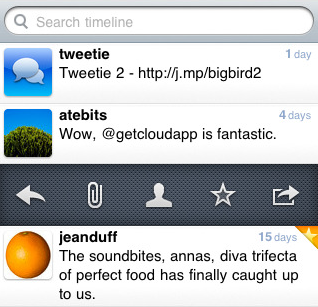
  1. Tweetie 2: One of the best social networking apps for iPhone. It makes it so easy to share files with your followers from your iPhone. The interface is very intuitive and easy to use.
  2. Twittelator: one of the best Twitter apps for the iPhone. It’s very convenient and comes with a lot of themes.
  3. Tweetdeck: if you have been on Twitter for a while, you probably know how good Tweetdeck is. And this one is going for free.
  4. TwitterFon Pro: one of the best iPhone clients for Twitter. Has everything you need to manage your Twitter account.
  5. TweetFlip: very similar in concept to Tweetdeck. Set up your panels and master your Twitter account.
  6. iTwitter: another innovative Twitter application for iPhone that makes it so easy to manage your followers.
  7. Voxie Pro Recorder: tired of texting on your phone? Now you can dictate to it.
  8. BirdFeed: another impressive Twitter client for iPhone. Great way to keep up with the latest updates on Twitter.
  9. Ziibii: is a great little app for folks who want to connect to Twitter, Facebook, and YouTube all from one place. And it’s free too!
  10. Twitter 3D: an innovative app that lets you manage your Twitter account and have fun in the process.
  11. SimplyTweet: manage your Twitter account or multiple accounts on your iPhone.
  12. TweetMic: create you own Twittercast and publish it on Twitter.
  13. Twitter World: uses Google’s translation service to let you talk to foreigners on Twitter.
  14. Twitterena: is a Twitter client on steroid. Everything you need to tweet more effectively is available in this app.
  15. Twinkle: a decent iPhone Twitter client that allows you to get in touch with your followers easily.
  16. Twitterrific: is still one of the top Twitter clients for the iPhone. It may have slipped a bit but it’s still up there with the big boys.
  17. Twittms: is a great way to send direct messages on Twitter. It’s simple to use too!
  18. Retweet: are you a retweet master? If you want to find out top retweeted stories, this is your app.
  19. LaTwit: is a sophisticated Twitter app that allows you to do all kinds of things on your
  20. GeoTwitter: automatically attaches map links to your tweets so people know where you are tweeting from! Read the rest of this entry »
Nov
05

TwitterPeek: One Dimensional Devices Making a Comeback?

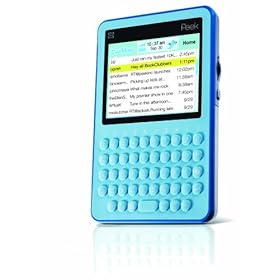
TwitterPeek Mobile Tweeting Device with Lifetime Service Included (Aqua)

Peek has been around for a while now. It’s a device that is designed to allow its owners to text for free without having to pay for one of those more advanced smart-phones. TwitterPeek is the latest device by manufacturers of Peek that targets Twitter users. Let’s say you want to stay in touch with your Twitter followers on the road without having to pay for a data plan with AT&T or Verizon. TwitterPeek lets you do that, and it doesn’t empty your pocket. The company does tout the fact that TwitterPeek doesn’t cost you as much as more advanced phones (like iPhone). But does it have a future?

So TwitterPeek is cheap and lets you tweet for cheap? Does that mean one trick pony devices are making a comeback? In fact, TwitterPeek and similar devices are flawed in a lot of ways. Those who have come to play with Twitter clients on iPhone and other top smartphones are going to find it difficult to play with TwitterPeek. The iPhone may cost you a bit more money but it’s more than just a phone. It can be a Wave device, a Twitter device, an e-mail device, and much more. Read the rest of this entry »

Oct
29

8 Best Twitter Clients for iPhone

We have had a number of lists on iPhone applications on iPhoneness, but we haven’t had so far is an updated listed of Twitter apps that you can use on your iPhone to tweet on the go. Twitter is quickly becoming one of the most popular destinations on the web, and if you own an iPhone, you can’t afford not to put a decent Twitter app on it. With that in mind, here are 8 best Twitter iPhone apps that help you tweet more effectively on the road:

Twittelator Pro: one of the best premium clients available for iPhone. It makes it so easy to work with images, sounds, and Twitter in general. The app that I am using currently.

Tweetie 2: it’s close second in my book. It makes it so easy to share files with your followers from your iPhone. The interface is very intuitive and easy to use.

Twitterena: has a whole lot of features to help you manage multiple twitter accounts on the go. It also supports Facebook as well.

TweetDeck: TweetDeck is certainly a powerful Twitter client, considering that it’s free as well. Never quite got used to it on my iPhone but I do use it on my PC.

Twitterrific Premium: lets you manage multiple accounts on Twitter. You can also do research and manage trends on Twitter. Read the rest of this entry »

Jun
18

Tweetdeck for iPhone Released

There was a time when Twitter used to get no respect from the average Joe. But you certainly can’t make that argument today as more people pick up Twitter everyday. Whether you want to use Twitter for your business or personal pleasure, there is no better way to connect with others and discuss ideas than using Twitter. But in order to get the best out of Twitter, you need to be actively involved. That means spending a bit of your time on a daily basis to tweet interesting content, retweet others’ content, and reply to your “replies” and direct messages. With popular Twitter clients such as Tweetdeck, you can easily manage your account and get things done faster than ever. And now with Tweetdeck being released for iPhone, you can tweet like a pro on the go.

145

Tweetdeck for iPhone comes with the features many have come to love on the desktop edition of Tweetdeck. You can easily see your messages, replies, and updates all in one place.You can also manage multiple accounts, and share photos and links easily right from your iPhone. If you have a decent number of followers on Twitter, you know how easy it can be to miss conversations, but thanks to Tweetdeck you don’t have to. It allows you to monitor your discussions and create groups to manage your Twitter account more effectively.

146

There is a lot to love about Tweetdeck. It makes tweeting and retweeting a whole lot easier. It also makes it easy to share your Twitpic and YFrog pictures on your phone. All in all, if you have used Tweetdeck’s desktop client before, you are going to love Tweetdeck for iPhone. It’s free, effective, and gets the job done.

Your turn: what’s your favorite Twitter client for iPhone?

May
04

Best Twitter Applications for iPhone

Abstract shape

Twitter is growing exponentially and more folks are joining the community each day to discuss news, ideas, and fun facts. If you have been on Twitter for a while, you probably know how much effort it takes to truly participate in the community and provide value to others. You wouldn’t want to tweet only once or twice a day. Thankfully, there are many iPhone applications that help you tweet like a pro. If you are planning to keep up with your Twitter account, here are a few applications you may want to try:

  • Twittelator Pro: one of the best Twitter apps for the iPhone. It’s very convenient and comes with a lot of themes.
  • Tweetie: Tweetie is another great iPhone client for Twitter. It’s very convenient too.
  • Twitterena: a cool looking iPhone and iPod Touch Twitter application that lets you manage your Twitter account more effectively.
  • Ziibii: Ziibii is a great little app for folks who want to connect to Twitter, Facebook, and YouTube all from one place. And it’s free too!
  • Twinkle: a decent iPhone Twitter client that allows you to get in touch with your followers easily.
  • Whrrl 2.0: Whrrl is another cool social networking application that allows you to stay in touch with your friends on Facebook and Twitter.
  • Loopt: Loopt needs no introduction. And Loopt for iPhone allows you to update your Facebook and Twitter accounts easily.
  • Twitterrific Premium: Twitterrific is still one of the top Twitter clients for the iPhone. It may have slipped a bit but it’s still up there with the big boys.
  • Twitterfon: Twitterfon is a lightweight Twitter application for iPhone. It’s easy to use and convenient.
  • Fring: Fring is a cool little social networking app that allows you to manage your MSN, Yahoo, and Twitter accounts.
  • Twiltr: another great app that lets you manage your tweets and filter out those annoying twitterers.
  • Twitterboost: displays a random profile to see if you are interested in following that user.
  • Summizer – Twitter Search Trend: a cool little Twitter app that allows you to track trends on Twitter.
  • Twittms: Twittms is a great way to send direct messages on Twitter. It’s simple to use too!
  • TwitterVision: TwitterVision is a cool Twitter application for iPhone that allows you to see where in the world people are tweeting from. Very fun to use.
  • Gyazickr: lets you tweet photos easily on your iPhone.

There you have it. If you are looking for a Twitter client on iPhone, you can’t go wrong with the above apps. Now you can feed your Twitter addiction right on your iPhone.

Your take: which Twitter iPhone client is your favorite?