• Hot Stories
    • Top Apps
    • Accessories
    • Wearables
  • iOS Apps
  • Robots & Drones
    • Smart Robots
    • Drones
  • Home Automation
  • Support
    • Partners

iPhoneNess

Covering everything iPhone

    • Trending

      All time

    • 20 Best Calendar Apps for iPhone + Videos

      191 Comments

    • 10+ Best iPhone GPS Apps for Car Drivers

      77 Comments

    • Latest Stories

      What is new?

    • accrosoo F94 iPad Keyboard Case with 4-in-1 Hub

      December 4, 2025

    • LIFEHACKR Smart Water Bottle with MagSafe Mount

      December 4, 2025

    • Comments

      Most Recent

    • Cyrus on:

      Chargerito: Smallest Phone Charger?

    • chargerito on:

      Chargerito: Smallest Phone Charger?

  • Trends
    • 25+ iPhone Compatible Fitness Equipment
    • 30+ Flexible iPhone Mounts & Stands
    • 12 Stylish iPhone Purses & Bags
    • 15+ Awesome Solar Chargers for iPhone
    • 45+ Amazon Alexa-Enabled Smart Home Devices for iOS Users
    • 15 iPhone Garage Door Openers You Should See
    • 35+ Must See Augmented Reality Toys & Gadgets
    • 25+ Star Wars Gadgets & Gizmos for iPhone & iPad Fans
    • 40+ Awesome iPhone Compatible Robots for Kids
    • 15 iPhone Mounts & Accessories for GoPro Users
  • News
    • Guides
    • Cool Items
    • iPhone 5S
    • iWatch
    • iPad 5
    • iPad Mini
    • Kickstarter
  • iOS Apps
    • iPhone Apps
    • iPad Apps
    • Jailbreak
  • Tools
    • Alarm Clocks
    • Board Games
    • Calendars
    • Fitness Apps
    • GPS & Navigation
      • Outdoors
    • iOS Astronomy
  • Accessories
    • iPhone Add-ons
    • iPad Add-ons
  • Disclaimer
  • Contact

iPhone Programming 101, part Deux

0
  • by Mike Smithwick
  • in Guest Posts
  • — 20 Apr

A guest post by Mike Smithwick, author of Distant Suns 2 for the iPhone/iPad and blogger at distantsuns.com. Mike is a seasoned iPhone/iPad developer who has developed numerous iPhone applications. He has recently released Distant Suns for iPad. Follow Mike’s work on Twitter for more information.
Augmented reality toys & gizmos ➡️ for iPhone & iPad

Credit: Distant Suns

Sorry for the long delay since the previous column. Something called an iPad I think, came out last week and I was in a rush to have something in the store on day 1. This column is to either help software neophytes get going on their own great app ideas, or to at least illustrate the process for the curious.

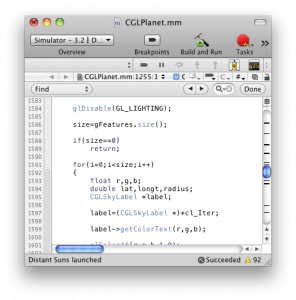
We left off the previous story with our hero puzzled over something called Objective-Cand Xcode with very little knowledge of what to do. As with any craft, developers have a set of tools. With iPhone and now iPad programming the main tool is something called Xcode.

By comparison, Microsofties use Visual Studio while Android types opt for an open-source system called Eclipse. While Xcode and Eclipse are free, Visual Studio can cost upwards of $1000 depending what options you need.

So, what does Xcode do? It will simply let you input, organize, “compile” and test your program from beginning to end. Software input is via a fancy-pants text-editor. In just the same way that Microsoft Word has all sorts of little tools and utilities to compose a book, Xcode’s editor has equivalent tools for typing in a program. It has things that keep track of the specialized syntax needed for the code to minimize errors, color coding parts of the text to make it more clear, or linking parts with the documentation.

After typing in your code, then comes the moment of truth, compiling. Compiling is taking the human readable (well, for some humans at least) text and converting it, or rather, compiling it down to the binary codes the iPhone’s chip can understand. If you made an error, the compiler will typically flag it for you, in which case you fix it and compile again. (and again and again) Read the rest of this article…
Also check out:
  • Lexon Oblio Box iPhone Charger & UVC Sanitizer


**Disclaimer: Our articles may contain aff links. As an Amazon Associate we earn from qualifying purchases. Please read our disclaimer on how we fund this site.


Currently trending posts:

  • Distant Suns 3 Giveaway (Contest Is Over!)
  • iPhone Programming 101, part Four: Designing your app
  • Yet another iPhone programming article
  • iPhone Programming 101, part Three: Languages
  • iPhone programming 101, part five
  • iPad Launch: View from the Palo Alto store

You may want to see:

  • 5 Must See Lua IDEs for iPhone
  • 5 Audio Travel Guide Apps for iPhone
  • Vision Pro Guided Guest Mode App Lets You Create Custom Guides
  • Teach Kids Programming with These 7 iOS Apps

Tags: guideprogramming


Add your reaction

Leave a Reply Cancel reply

Your email address will not be published. Required fields are marked *

  • Follow Us

    Facebooktwitterrssyoutube

  • Search & Subscribe

  • Trending Apps

    • 6 Interactive Chemistry Apps for iPhone & iPad
    • 5 Must See iPhone HTTP Clients
    • 5 Must See AI Diet Apps for iPhone & iPad
    • 5 Awesome Weather Apps for iPhone
    • 4 Must See iPhone Boondocking Apps
    • 7 Must See Puppy Training iPhone Apps
  • Current Visits:

    • 4 Must See iPhone Gaming Triggers
    • 5 App Smart Hose Faucet Timers
    • 6 iPhone Compatible Under Desk Exercise Machines
  • Categories

    Admin AI Tools & Apps Apple Vision Pro Apps Apple Watch Accessories Commentary & Predictions Cool Finds DIY & Hacks Drones Events Giveaways Guest Posts Guides & Tools Home Automation Infographics iOS Security iPad accessories iPad Apps iPhone Accessories iPhone Apps iPhone Books iPhone Programming iPhone Thoughts iPhone Tips iPhotography Jailbreak Leaks Lists Mac Accessories News Reviews Smart Robots Uncategorized Videos Virtual Reality Wearables
  • Home
  • Guest Posts
  • iPhone Programming 101, part Deux
  • Tags

    3d printer 4k ai alexa Android app app enabled Apple apple watch app lists augmented reality bluetooth camera case Charger coding drone fitness GPS home automation iOS iPad iPhone iphone 5 keyboard modular mower power bank python rig robot robotic security camera smart Smartphone smartwatch Solar speaker stand stem top accessories vision pro wearable wifi wireless charger
  • Current visits

    • CaseCorder: 3D Printed Camcorder Case for iPhone XR
    • Ikan Canvas Bi-Color Bendable LED Light with App Control
    • ECOVACS DEEBOT X2 OMNI 8000Pa Siri Compatible Robot Vacuum
    • Eve Play: AirPlay Audio Streaming Device for HiFi Speakers, Amplifiers
    • DreamWave M.8 Full Body Massage Chair with Bluetooth Speakers
  • Search

  • Connect:

  •  

  • News
  • Partnerships
  • Our Reviews
  • Terms of Use
  • Privacy Policy
  • Takedown Requests
  • Support Us
  • RSS

© Copyright 2024 iPhoneness. EntropyGrid
iPhoneness is an independent website and has not been authorized, sponsored, or otherwise approved by Apple Inc. iPhone and iPhone 3G are among the trademarks or registered trademarks owned by or exclusively licensed to Apple Inc.