
• Hot Stories
    • Top Apps
    • Accessories
    • Wearables
  • iOS Apps
  • Robots & Drones
    • Smart Robots
    • Drones
  • Home Automation
  • Support
    • Partners

iPhoneNess

Covering everything iPhone

    • Trending

      All time

    • 20 Best Calendar Apps for iPhone + Videos

      191 Comments

    • 10+ Best iPhone GPS Apps for Car Drivers

      77 Comments

    • Latest Stories

      What is new?

    • accrosoo F94 iPad Keyboard Case with 4-in-1 Hub

      December 4, 2025

    • LIFEHACKR Smart Water Bottle with MagSafe Mount

      December 4, 2025

    • Comments

      Most Recent

    • Cyrus on:

      Chargerito: Smallest Phone Charger?

    • chargerito on:

      Chargerito: Smallest Phone Charger?

  • Trends
    • 25+ iPhone Compatible Fitness Equipment
    • 30+ Flexible iPhone Mounts & Stands
    • 12 Stylish iPhone Purses & Bags
    • 15+ Awesome Solar Chargers for iPhone
    • 45+ Amazon Alexa-Enabled Smart Home Devices for iOS Users
    • 15 iPhone Garage Door Openers You Should See
    • 35+ Must See Augmented Reality Toys & Gadgets
    • 25+ Star Wars Gadgets & Gizmos for iPhone & iPad Fans
    • 40+ Awesome iPhone Compatible Robots for Kids
    • 15 iPhone Mounts & Accessories for GoPro Users
  • News
    • Guides
    • Cool Items
    • iPhone 5S
    • iWatch
    • iPad 5
    • iPad Mini
    • Kickstarter
  • iOS Apps
    • iPhone Apps
    • iPad Apps
    • Jailbreak
  • Tools
    • Alarm Clocks
    • Board Games
    • Calendars
    • Fitness Apps
    • GPS & Navigation
      • Outdoors
    • iOS Astronomy
  • Accessories
    • iPhone Add-ons
    • iPad Add-ons
  • Disclaimer
  • Contact

2 Ways to Connect SD Cards and USB to iPad

0
  • by Ci
  • in iPhone Tips
  • — 4 Oct

iPad is one of the best tablets on the market. It packs a lot of power and is great for business and entertainment. Unfortunately, Apple has not fit a SD card reader nor a USB port on this device. That means you won’t be able to transfer your photos (or other content) from your computer or digital camera to your iPad (directly). The good news is there are SD card and USB adapters for iPad that can get the job done without too much fuss.

Check out these uniquely awesome ✔️ iPhone gadgets & gizmos

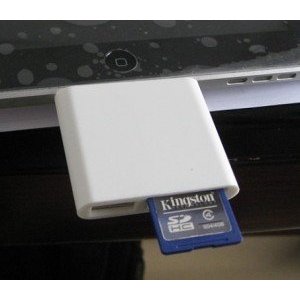
Apple iPad Camera Connection Kit has everything you’d need to connect your digital camera or its SD card to your iPad. It has two mini adapters that handle SD and USB (see the above video demonstration courtesy of IGM). It’s a solid solution but you are dealing with two mini adapters. Bear Motion SD Card/ USB hybrid reader for iPad offers the best of both worlds in one shot.
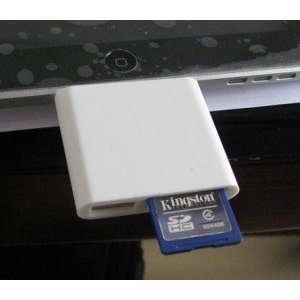
Bear Motion’s SD Card reader for iPad not only lets you read your JPEG and RAW photo files on your iPad, it allows you to connect your USB keyboard to your device (especially if you don’t have a bluetooth keyboard). It is a more convenient option than Apple’s official adapters as it is only one adapter we are dealing with.

Also check out:
  • GOYOJO GW192A Thermal Imaging Camera for iPhone/Android

Apple could have and probably should have included a SD slot on iPad. That probably won’t happen anytime soon (from what we have heard about iPad 2). The above SD/USB adapters for iPad let you get around this issue with no major trouble.

**Disclaimer: Our articles may contain aff links. As an Amazon Associate we earn from qualifying purchases. Please read our disclaimer on how we fund this site.


Currently trending posts:

  • 5 Awesome iPad Card Readers / Adapters
  • 5 Awesome Compact Accessories for iPad
  • Hama Wi-Fi Data Reader for iPad
  • 10+ Must See iPad Point of Sale Accessories & Hardware
  • 2 Handy USB OTG Adapters for iPhone
  • iPad Comes to MacMall, Camera In The Works?

You may want to see:

  • iOgrapher Multi Pro Adjustable iPad Case with Handles
  • Measure Your Site Traffic on iPhone: 6 Apps Measure Your Site Traffic on iPhone: 6 Apps
  • The iPad Aftermath The iPad Aftermath
  • RemoFinger G Wireless Foot Controller for iPad

Tags: iPadtips


Add your reaction

Leave a Reply Cancel reply

Your email address will not be published. Required fields are marked *

  • Follow Us

    Facebooktwitterrssyoutube

  • Search & Subscribe

  • Trending Apps

    • 7 Raw Diet iPhone Apps
    • 11 Awesome Reminder Apps for iPhone
    • 5+ Stretching iPhone Apps with Flexibility Exercises
    • 2 iPhone Apps for CEH Exam
    • 7 Awesome iPhone Apps for 7-Minute Interval Training
    • Improve Your Tennis: 5 Tennis Training iPhone Apps
  • Current Visits:

    • 5 Smart Soil Moisture Sensors w/ iOS Support
    • 2 iPhone Compatible Senior Care Devices
    • 5 App Smart Fetus Cameras & Pregnancy Monitors
  • Categories

    Admin AI Tools & Apps Apple Vision Pro Apps Apple Watch Accessories Commentary & Predictions Cool Finds DIY & Hacks Drones Events Giveaways Guest Posts Guides & Tools Home Automation Infographics iOS Security iPad accessories iPad Apps iPhone Accessories iPhone Apps iPhone Books iPhone Programming iPhone Thoughts iPhone Tips iPhotography Jailbreak Leaks Lists Mac Accessories News Reviews Smart Robots Uncategorized Videos Virtual Reality Wearables
  • Home
  • iPhone Tips
  • 2 Ways to Connect SD Cards and USB to iPad
  • Tags

    3d printer 4k ai alexa Android app app enabled Apple apple watch app lists augmented reality bluetooth camera case Charger coding drone fitness GPS home automation iOS iPad iPhone iphone 5 keyboard modular mower power bank python rig robot robotic security camera smart Smartphone smartwatch Solar speaker stand stem top accessories vision pro wearable wifi wireless charger
  • Current visits

    • 7sensors Smart Soil-based Indoor Gardening System
    • Bakeey A10 Walkie Talkie iPhone Case for Outdoors
    • Renogy Phoenix Solar Generator Briefcase
    • Ford’s Smart Jacket for Cyclists with Lights, GPS Vibration
    • Tripp Lite App Connected 750VA UPS Battery Backup
  • Search

  • Connect:

  •  

  • News
  • Partnerships
  • Our Reviews
  • Terms of Use
  • Privacy Policy
  • Takedown Requests
  • Support Us
  • RSS

© Copyright 2024 iPhoneness. EntropyGrid
iPhoneness is an independent website and has not been authorized, sponsored, or otherwise approved by Apple Inc. iPhone and iPhone 3G are among the trademarks or registered trademarks owned by or exclusively licensed to Apple Inc.
