• Hot Stories
    • Top Apps
    • Accessories
    • Wearables
  • iOS Apps
  • Robots & Drones
    • Smart Robots
    • Drones
  • Home Automation
  • Support
    • Partners

iPhoneNess

Covering everything iPhone

    • Trending

      All time

    • 20 Best Calendar Apps for iPhone + Videos

      191 Comments

    • 10+ Best iPhone GPS Apps for Car Drivers

      77 Comments

    • Latest Stories

      What is new?

    • accrosoo F94 iPad Keyboard Case with 4-in-1 Hub

      December 4, 2025

    • LIFEHACKR Smart Water Bottle with MagSafe Mount

      December 4, 2025

    • Comments

      Most Recent

    • Cyrus on:

      Chargerito: Smallest Phone Charger?

    • chargerito on:

      Chargerito: Smallest Phone Charger?

  • Trends
    • 25+ iPhone Compatible Fitness Equipment
    • 30+ Flexible iPhone Mounts & Stands
    • 12 Stylish iPhone Purses & Bags
    • 15+ Awesome Solar Chargers for iPhone
    • 45+ Amazon Alexa-Enabled Smart Home Devices for iOS Users
    • 15 iPhone Garage Door Openers You Should See
    • 35+ Must See Augmented Reality Toys & Gadgets
    • 25+ Star Wars Gadgets & Gizmos for iPhone & iPad Fans
    • 40+ Awesome iPhone Compatible Robots for Kids
    • 15 iPhone Mounts & Accessories for GoPro Users
  • News
    • Guides
    • Cool Items
    • iPhone 5S
    • iWatch
    • iPad 5
    • iPad Mini
    • Kickstarter
  • iOS Apps
    • iPhone Apps
    • iPad Apps
    • Jailbreak
  • Tools
    • Alarm Clocks
    • Board Games
    • Calendars
    • Fitness Apps
    • GPS & Navigation
      • Outdoors
    • iOS Astronomy
  • Accessories
    • iPhone Add-ons
    • iPad Add-ons
  • Disclaimer
  • Contact

How to Run DeepSeek R1 On Smartphones

0
  • by Ci
  • in News
  • — 24 Jan

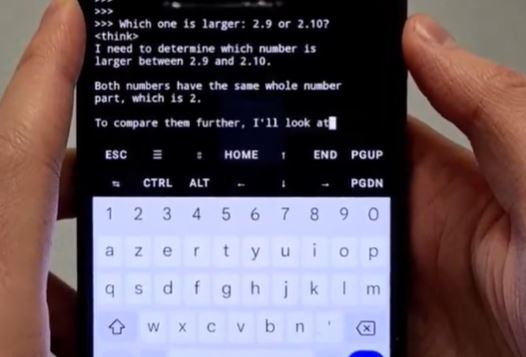
DeepSeek R1 has captured the imagination of AI enthusiasts in the past couple of years. It is an open source model that can compete very well against the top closed models. If you know a bit about Ollama or LM Studio, you can easily run it on your computer for free. It is also possible to run it on your Android smartphone.
More like this ➡️ here

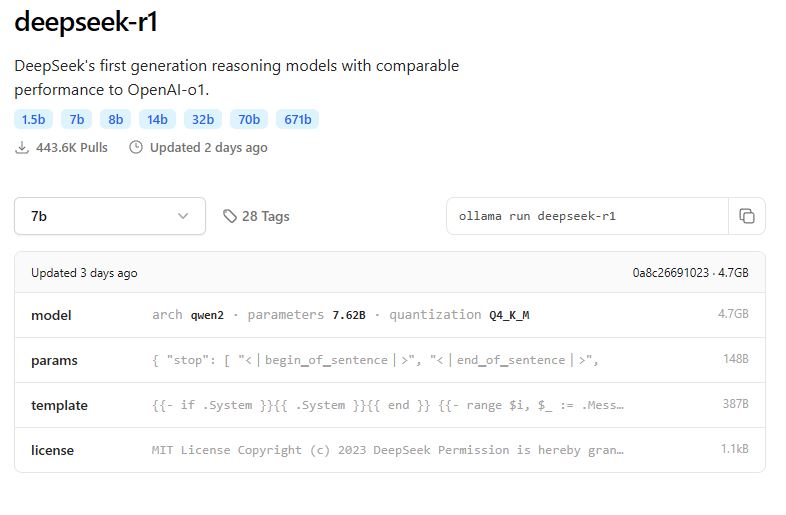
To get started, you will have to set up Termux on Android. It is a terminal emulator that allows Android devices to run a Linux environment. Once you have done that, you can install and compile Ollama by cloning its GitHub repository and run it with the serve command. From there, you will just have to pick which model you would like to run. For DeepSeek R1, you just have to use this command: “ollama run deepseek-r1.” You can see it working on Android here:

Wow DeepSeek R1 version 1.5B runs perfectly locally on my phone 😳

So you can have a model that outperforms GPT-4o and Claude 3.5 Sonnet on math in your pocket.

Mind-blowing pic.twitter.com/0J3uLXI6ZR

— Paul Couvert (@itsPaulAi) January 22, 2025


**Disclaimer: Our articles may contain aff links. As an Amazon Associate we earn from qualifying purchases. Please read our disclaimer on how we fund this site.


Currently trending posts:

  • 3 Cool DeepSeek Powered iPhone Compatible Gadget
  • Symbian Goes Open Source, Apple To Follow?
  • Reins Ollama Private Chat App for Mac
  • Net Runner: Machine Learning App for iPhone
  • Private LLM: Local AI Chatbot for iPhone
  • Manus AI iOS App Brings a Claude 3.7 General Agent To Your Phone

You may want to see:

  • Rocketbook: Microwavable Notebook + Cloud
  • Fujifilm INSTAX SHARE SP-2 Smartphone Printer
  • GATE Smart Mailbox Lets You Know When You Have Mail
  • Pura: App-enabled Water Fountain for Cats

Tags: AndroidDeepSeek


Add your reaction

Leave a Reply Cancel reply

Your email address will not be published. Required fields are marked *

  • Follow Us

    Facebooktwitterrssyoutube

  • Search & Subscribe

  • Trending Apps

    • 14 Must See iPhone Apps for Weightlifters
    • 5 Gardening Guide Apps for iPhone
    • 5 Must See Blackjack iPhone Apps
    • 6 Awesome Twitter Apps for iPad
    • 5 iPhone Apps for Lactose Intolerant People
    • Best Twitter Applications for iPhone
  • Current Visits:

    • 5 Smart Kitchen Gizmos with AI Food Recognition
    • 2 Smart Wearable Navigation Belts with Vibration Alerts
    • 10+ Must See iPhone Compatible Diabetes Gadgets & Gizmos
  • Categories

    Admin AI Tools & Apps Apple Vision Pro Apps Apple Watch Accessories Commentary & Predictions Cool Finds DIY & Hacks Drones Events Giveaways Guest Posts Guides & Tools Home Automation Infographics iOS Security iPad accessories iPad Apps iPhone Accessories iPhone Apps iPhone Books iPhone Programming iPhone Thoughts iPhone Tips iPhotography Jailbreak Leaks Lists Mac Accessories News Reviews Smart Robots Uncategorized Videos Virtual Reality Wearables
  • Home
  • News
  • How to Run DeepSeek R1 On Smartphones
  • Tags

    3d printer 4k ai alexa Android app app enabled Apple apple watch app lists augmented reality bluetooth camera case Charger coding drone fitness GPS home automation iOS iPad iPhone iphone 5 keyboard modular mower power bank python rig robot robotic security camera smart Smartphone smartwatch Solar speaker stand stem top accessories vision pro wearable wifi wireless charger
  • Current visits

    • EYSE: WiFi 3D Cam for Immersive Video
    • Proper Audio 2 Speaker for iPhone
    • Lightcase Pro: Pop Up Studio for Smartphone Photography
    • STEPP Smart Wearable Running Coach
    • Somnox 2 App Smart Sleep & Breathing Robot
  • Search

  • Connect:

  •  

  • News
  • Partnerships
  • Our Reviews
  • Terms of Use
  • Privacy Policy
  • Takedown Requests
  • Support Us
  • RSS

© Copyright 2024 iPhoneness. EntropyGrid
iPhoneness is an independent website and has not been authorized, sponsored, or otherwise approved by Apple Inc. iPhone and iPhone 3G are among the trademarks or registered trademarks owned by or exclusively licensed to Apple Inc.