• Hot Stories
    • Top Apps
    • Accessories
    • Wearables
  • iOS Apps
  • Robots & Drones
    • Smart Robots
    • Drones
  • Home Automation
  • Support
    • Partners

iPhoneNess

Covering everything iPhone

    • Trending

      All time

    • 20 Best Calendar Apps for iPhone + Videos

      191 Comments

    • 10+ Best iPhone GPS Apps for Car Drivers

      77 Comments

    • Latest Stories

      What is new?

    • 4 AI Powered Calendars Everyone Should See

      March 7, 2026

    • Baseus PicoGo AM52 Qi2.2 Magnetic Power Bank Slim

      March 6, 2026

    • Comments

      Most Recent

    • Cyrus on:

      Chargerito: Smallest Phone Charger?

    • chargerito on:

      Chargerito: Smallest Phone Charger?

  • Trends
    • 25+ iPhone Compatible Fitness Equipment
    • 30+ Flexible iPhone Mounts & Stands
    • 12 Stylish iPhone Purses & Bags
    • 15+ Awesome Solar Chargers for iPhone
    • 45+ Amazon Alexa-Enabled Smart Home Devices for iOS Users
    • 15 iPhone Garage Door Openers You Should See
    • 35+ Must See Augmented Reality Toys & Gadgets
    • 25+ Star Wars Gadgets & Gizmos for iPhone & iPad Fans
    • 40+ Awesome iPhone Compatible Robots for Kids
    • 15 iPhone Mounts & Accessories for GoPro Users
  • News
    • Guides
    • Cool Items
    • iPhone 5S
    • iWatch
    • iPad 5
    • iPad Mini
    • Kickstarter
  • iOS Apps
    • iPhone Apps
    • iPad Apps
    • Jailbreak
  • Tools
    • Alarm Clocks
    • Board Games
    • Calendars
    • Fitness Apps
    • GPS & Navigation
      • Outdoors
    • iOS Astronomy
  • Accessories
    • iPhone Add-ons
    • iPad Add-ons
  • Disclaimer
  • Contact

xBloom Studio App Smart Specialty Coffee Machine

0
  • by Ci
  • in Cool Finds
  • — 2 Dec

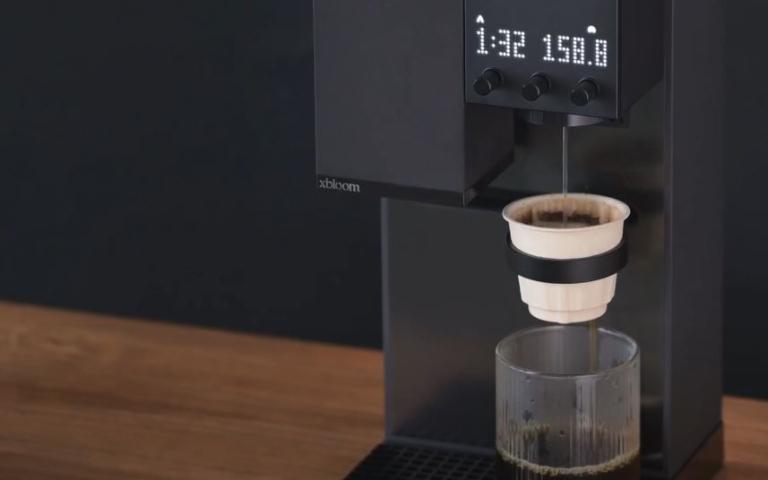
Here is one of the smartest coffee machines money can buy. The xBloom Studio has a LED matrix display and knobs for easy control. It combines with the Xbloom app to let you create and adjust your coffee. Its xPods come with whole beans and a filter. You just have to tap a recipe card, add the beans, and press start. This machine has autopilot, copilot, and freesolo modes.

30+ must see flexible iPhone mounts & stands

xBloom Studio User Guide: Navigate Autopilot Mode

This model has Bluetooth connectivity. When you start it, the dock moves to the grinder to catch the coffee. Once that is done, it will move to the brewer for the process to start. The display shows timer and volume settings. xBloom adjusts temperature, ratio, grind size, and pouring pattern for your drinks. The above video shows how this model works. The bad news? Something like this doesn’t come cheap.

[where to get it]

**Disclaimer: Our articles may contain aff links. As an Amazon Associate we earn from qualifying purchases. Please read our disclaimer on how we fund this site.


Currently trending posts:

  • Hiroia Hikaru V60 App Connected Coffee Brewer with Dynamic LEDs
  • Auroma One: App-enabled Coffee Machine
  • 7 Next Level iPhone Compatible Coffee Makers
  • Café Specialty Grind and Brew Coffee Maker with App Control
  • 3 Smart App-Enabled Coffee Machines
  • 8 Smartphone Controlled Coffee Makers & Grinders

You may want to see:

  • Yeedi C12 PRO Plus App Smart 8000Pa Robot Vacuum & Mop
  • Weo App Connected Bottle Enhances Your Water with Electrolysis
  • AquaTru Carafe Smart App Enabled Water Purifier
  • Duet Display: Use Your iPad As Extra Display for Your Mac

Tags: appcoffee maker


Add your reaction

Leave a Reply Cancel reply

Your email address will not be published. Required fields are marked *

  • Follow Us

    Facebooktwitterrssyoutube

  • Search & Subscribe

  • Trending Apps

    • 3 iPhone Apps for Pole Dancing
    • 5 Workout Schedulers for iPhone
    • 6 Kitchen Timer Apps for iPhone & iPad
    • 6 Must See Calisthenics iPhone Apps
    • How to Make Ringtones for iPhone: 5 iPhone Ringtone Makers
    • 5 Fun Gomoku iPhone Apps
  • Current Visits:

    • 4 App Connected Mosquito Repellents
    • 7 Smart iOS Compatible Gaming Gadgets
    • 7 iPhone Compatible Body Composition Analyzers
  • Categories

    Admin AI Tools & Apps Apple Vision Pro Apps Apple Watch Accessories Commentary & Predictions Cool Finds DIY & Hacks Drones Events Giveaways Guest Posts Guides & Tools Home Automation Infographics iOS Security iPad accessories iPad Apps iPhone Accessories iPhone Apps iPhone Books iPhone Programming iPhone Thoughts iPhone Tips iPhotography Jailbreak Leaks Lists Mac Accessories News Reviews Smart Robots Uncategorized Videos Virtual Reality Wearables
  • Home
  • Cool Finds
  • xBloom Studio App Smart Specialty Coffee Machine
  • Tags

    3d printer 4k ai alexa Android app app enabled Apple apple watch app lists augmented reality bluetooth camera case Charger coding drone fitness GPS home automation iOS iPad iPhone iphone 5 keyboard modular mower power bank python rig robot robotic security camera smart Smartphone smartwatch Solar speaker stand stem top accessories vision pro wearable wifi wireless charger
  • Current visits

    • 3 iOS-Compatible Smart Toothbrushes
    • VEVOR Hand Crank Charger for Smartphones & Laptops
    • Precision Pro Ace Bluetooth Smart Golf Cart Speaker
    • Wise Owl Spinning iPhone / Tablet Tray for Peloton Bike
    • Eve Outdoor Cam HomeKit Floodlight Camera
  • Search

  • Connect:

  •  

  • News
  • Partnerships
  • Our Reviews
  • Terms of Use
  • Privacy Policy
  • Takedown Requests
  • Support Us
  • RSS

© Copyright 2024 iPhoneness. EntropyGrid
iPhoneness is an independent website and has not been authorized, sponsored, or otherwise approved by Apple Inc. iPhone and iPhone 3G are among the trademarks or registered trademarks owned by or exclusively licensed to Apple Inc.