• Hot Stories
    • Top Apps
    • Accessories
    • Wearables
  • iOS Apps
  • Robots & Drones
    • Smart Robots
    • Drones
  • Home Automation
  • Support
    • Partners

iPhoneNess

Covering everything iPhone

    • Trending

      All time

    • 20 Best Calendar Apps for iPhone + Videos

      191 Comments

    • 10+ Best iPhone GPS Apps for Car Drivers

      77 Comments

    • Latest Stories

      What is new?

    • MOVE SPEED 4TB USB 3.2 Gen2 SSD for iPhone 17

      September 8, 2026

    • Shine Foldable Solar Charger with 20,000mAh Battery

      September 8, 2026

    • Comments

      Most Recent

    • Cyrus on:

      Chargerito: Smallest Phone Charger?

    • chargerito on:

      Chargerito: Smallest Phone Charger?

  • Trends
    • 25+ iPhone Compatible Fitness Equipment
    • 30+ Flexible iPhone Mounts & Stands
    • 12 Stylish iPhone Purses & Bags
    • 15+ Awesome Solar Chargers for iPhone
    • 45+ Amazon Alexa-Enabled Smart Home Devices for iOS Users
    • 15 iPhone Garage Door Openers You Should See
    • 35+ Must See Augmented Reality Toys & Gadgets
    • 25+ Star Wars Gadgets & Gizmos for iPhone & iPad Fans
    • 40+ Awesome iPhone Compatible Robots for Kids
    • 15 iPhone Mounts & Accessories for GoPro Users
  • News
    • Guides
    • Cool Items
    • iPhone 5S
    • iWatch
    • iPad 5
    • iPad Mini
    • Kickstarter
  • iOS Apps
    • iPhone Apps
    • iPad Apps
    • Jailbreak
  • Tools
    • Alarm Clocks
    • Board Games
    • Calendars
    • Fitness Apps
    • GPS & Navigation
      • Outdoors
    • iOS Astronomy
  • Accessories
    • iPhone Add-ons
    • iPad Add-ons
  • Disclaimer
  • Contact

4 Must See Vector Converters for iPhone

0
  • by Ci
  • in iPad Apps · iPhone Apps
  • — 9 Sep

Converting files on your smartphone doesn’t have to be hard. There are already many apps available that perform basic conversions fast. These 4 iPhone vector converters can turn your files to almost any major vector format:

Popular Vector Converters for iPhone
💡Make your home smart with these Alexa enabled connected devices

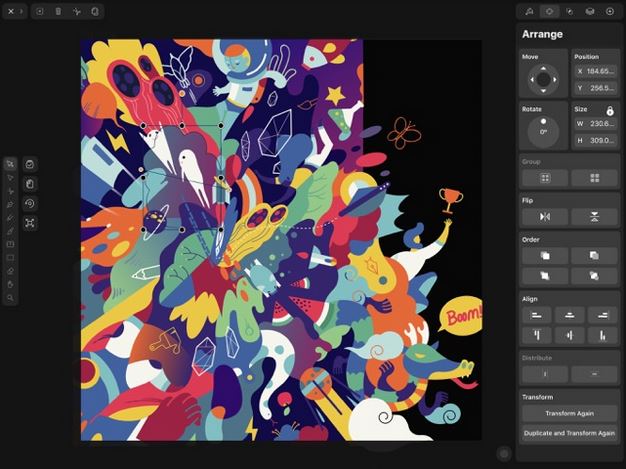
Vectornator X: a sophisticated vector converter app that lets you create vectors with pen, node, brush, and shape tools. It can automatically turn bitmap images into vectors with Auto Trace. It is compatible with Adobe Illustrator and Creative Cloud.
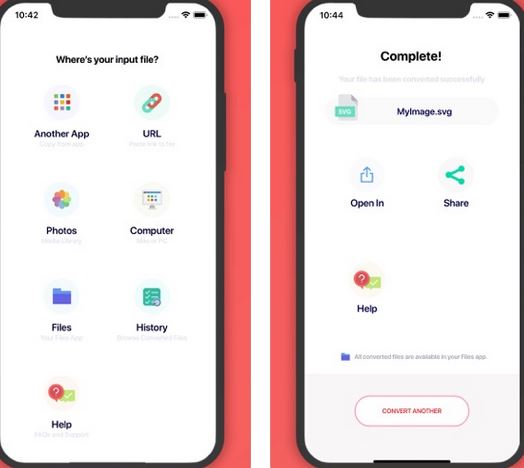
The Vector Converter: this app converts any image or vector to SVG, EPS, ICO, PNG, PDF, PS, JPG, EMF, WMF, BMP, TIFF, WEBP, or DXF format. You can open your files in image editors, Photos, and other apps. Conversion is done in the cloud.
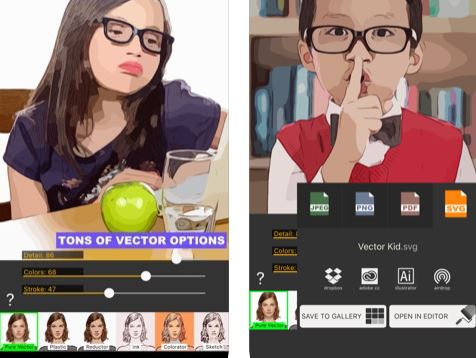
Imaengine Vector: turns your pictures into fully editable vector drawings with separate layers. It has 23 editable filters for you to play around with. You can export images in JPG, PNG, PDF and SVG formats up to 8000×8000 pixels.
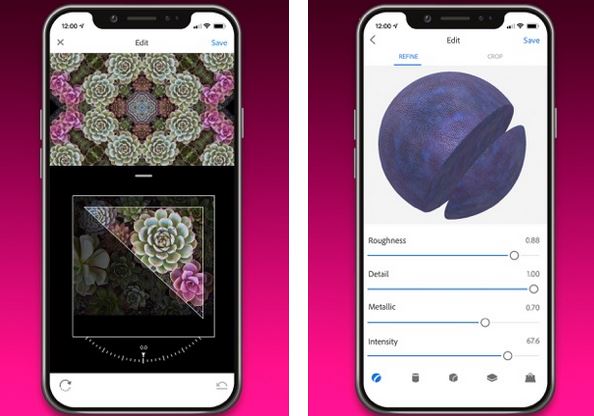
Adobe Capture: a pattern and vector maker for iPhone that turns your images into vector shapes. It lets you make patterns out of anything with your camera. You will also be able to create beautiful color themes, digital brushes, and 3D textures.

Have you found better vector converter apps for iOS? Please share them here.


**Disclaimer: Our articles may contain aff links. As an Amazon Associate we earn from qualifying purchases. Please read our disclaimer on how we fund this site.


Currently trending posts:

  • Vector Converter for iPhone
  • 3 Must See Cassette to MP3 Converters
  • 5 Must See TensorFlow Apps for iPhone
  • 10 Fun Photo Applications for iPhone
  • 10 Best Disk Management iPhone Apps
  • 5 Must See OpenAI DALL-E iPhone Apps for AI Art

You may want to see:

  • 5 iPhone Apps for Afib Detection & Management
  • 7 iPhone Apps for MTA and the NY Subway System 7 iPhone Apps for MTA and the NY Subway System
  • 7 Boxing Interval Timers for iPhone
  • 8 Cool iPhone Apps for Medical Marijuana 8 Cool iPhone Apps for Medical Marijuana

Tags: app listsvector converter


Add your reaction

Leave a Reply Cancel reply

Your email address will not be published. Required fields are marked *

  • Follow Us

    Facebooktwitterrssyoutube

  • Search & Subscribe

  • Trending Apps

    • 7 iOS Apps for Food Substitutions
    • 6 Awesome Half Marathon Apps for iPhone
    • 5 Awesome Astronomy Apps for Kids
    • 8 Best e-Book Reader Apps for iPad
    • How to: Lock/Unlock Your Mac From an iPhone / Apple Watch
    • 5 iPhone Apps for Lucid Dreaming
  • Current Visits:

    • 5 Smartphone Controlled Gaming Desks
    • 7 Must See Smart Alarm Clocks
    • 5 iPhone Accessories for Dual Livestreaming
  • Categories

    Admin AI Tools & Apps Apple Vision Pro Apps Apple Watch Accessories Commentary & Predictions Cool Finds DIY & Hacks Drones Events Giveaways Guest Posts Guides & Tools Home Automation Infographics iOS Security iPad accessories iPad Apps iPhone Accessories iPhone Apps iPhone Books iPhone Programming iPhone Thoughts iPhone Tips iPhotography Jailbreak Leaks Lists Mac Accessories News Reviews Smart Robots Uncategorized Videos Virtual Reality Wearables
  • Home
  • iPad Apps
  • 4 Must See Vector Converters for iPhone
  • Tags

    3d printer 4k ai alexa Android app app enabled Apple apple watch app lists augmented reality bluetooth camera case Charger coding drone fitness GPS home automation iOS iPad iPhone iphone 5 keyboard modular mower power bank python rig robot robotic security camera smart Smartphone smartwatch Solar speaker stand stem top accessories vision pro wearable wifi wireless charger
  • Current visits

    • MAIWO 5-in-1 Smartphone Grip with 2TB SSD
    • MERACH E12 iPhone Compatible Elliptical with 3 Modes
    • Apogee Boom iPad/iPad Compatible USB Audio Interface for Podcasters, YouTubers
    • ICECO APL35 App Connected Dual Zone Freezer
    • Halot One Plus App Connected 3D Printer
  • Search

  • Connect:

  •  

  • News
  • Partnerships
  • Our Reviews
  • Terms of Use
  • Privacy Policy
  • Takedown Requests
  • Support Us
  • RSS

© Copyright 2026 iPhoneness. EntropyGrid
iPhoneness is an independent website and has not been authorized, sponsored, or otherwise approved by Apple Inc. iPhone and iPhone 3G are among the trademarks or registered trademarks owned by or exclusively licensed to Apple Inc.