• Hot Stories
    • Top Apps
    • Accessories
    • Wearables
  • iOS Apps
  • Robots & Drones
    • Smart Robots
    • Drones
  • Home Automation
  • Support
    • Partners

iPhoneNess

Covering everything iPhone

    • Trending

      All time

    • 20 Best Calendar Apps for iPhone + Videos

      191 Comments

    • 10+ Best iPhone GPS Apps for Car Drivers

      77 Comments

    • Latest Stories

      What is new?

    • accrosoo F94 iPad Keyboard Case with 4-in-1 Hub

      December 4, 2025

    • LIFEHACKR Smart Water Bottle with MagSafe Mount

      December 4, 2025

    • Comments

      Most Recent

    • Cyrus on:

      Chargerito: Smallest Phone Charger?

    • chargerito on:

      Chargerito: Smallest Phone Charger?

  • Trends
    • 25+ iPhone Compatible Fitness Equipment
    • 30+ Flexible iPhone Mounts & Stands
    • 12 Stylish iPhone Purses & Bags
    • 15+ Awesome Solar Chargers for iPhone
    • 45+ Amazon Alexa-Enabled Smart Home Devices for iOS Users
    • 15 iPhone Garage Door Openers You Should See
    • 35+ Must See Augmented Reality Toys & Gadgets
    • 25+ Star Wars Gadgets & Gizmos for iPhone & iPad Fans
    • 40+ Awesome iPhone Compatible Robots for Kids
    • 15 iPhone Mounts & Accessories for GoPro Users
  • News
    • Guides
    • Cool Items
    • iPhone 5S
    • iWatch
    • iPad 5
    • iPad Mini
    • Kickstarter
  • iOS Apps
    • iPhone Apps
    • iPad Apps
    • Jailbreak
  • Tools
    • Alarm Clocks
    • Board Games
    • Calendars
    • Fitness Apps
    • GPS & Navigation
      • Outdoors
    • iOS Astronomy
  • Accessories
    • iPhone Add-ons
    • iPad Add-ons
  • Disclaimer
  • Contact

How to: Annotate PDF Documents on iPad — 7 Apps

1
  • by Ci
  • in iPad Apps
  • — 13 May

Being able to open PDF documents on an iPad is nice. Sometimes, you want to do more with your PDF documents though. In order to make changes to your PDF files, add your notes, or sign them, you are going to need a decent PDF editor. These 7 iPad PDF editors help you with that:
30+ must see flexible iPhone mounts & stands

iAnnotate PDF: the main app we use in our company. It is not the cheapest PDF annotation app around. But its development quality is superb. It provides you with various tools to annotate your files with. Dropbox and WebDAV are supported too.
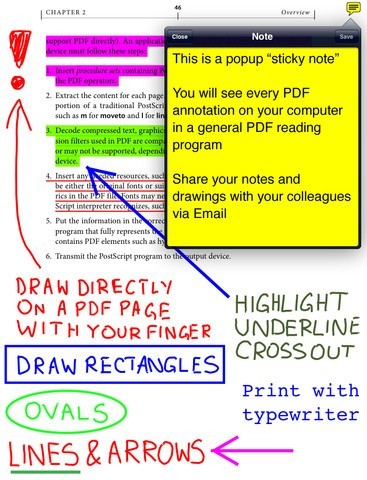
GoodReader for iPad: one of the most popular PDF apps for iPad. It has a beautiful interface and can read virtually anything. It handles huge PDF and TXT files well too. Of course, you can use this to edit your PDF files.
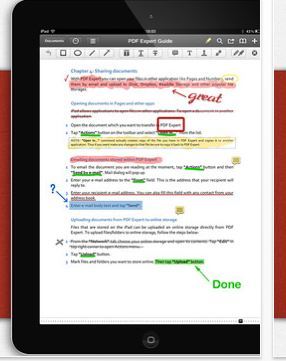
PDF Expert: we have used this app to fill out PDF forms many times in the past. It reads iWork, MS office, and other file formats. It supports GoogleDocs, iDisk, and Dropbox.
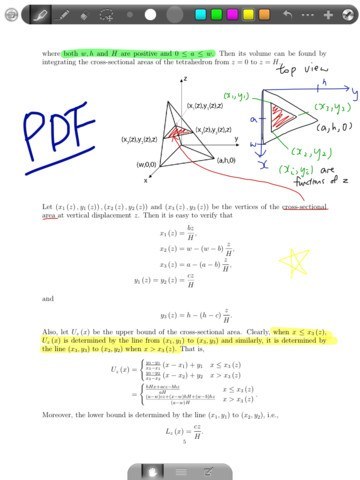
GoodNotes for iPad: lets you take handwritten notes, sketch diagrams, and mark-up PDF files. It organizes your documents on a beautiful bookshelf. GoodNotes is fairly affordable too.
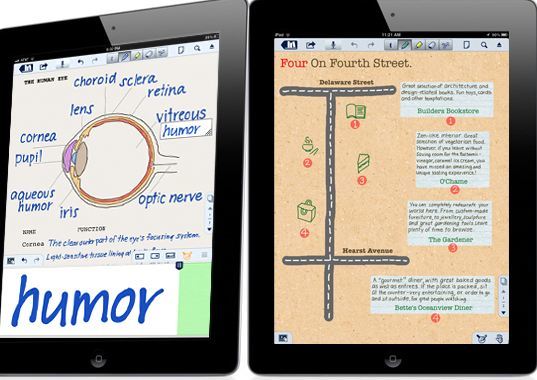
Notability for iPad: this is one of the best note taking apps we have tested. It lets you annotate PDF files, draw diagrams, and record audio. It support Dropbox sync.
Augmented reality toys & gizmos ➡️ for iPhone & iPad

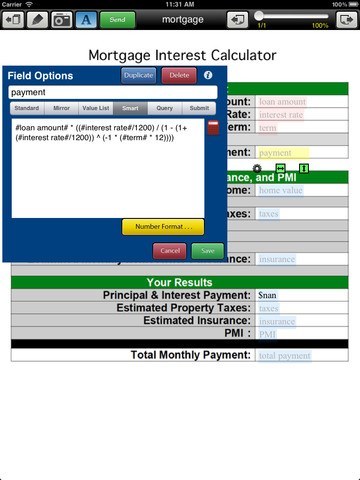
Type on PDF Pro: Type on PDF is compatible with iPhone and iPad. It lets you make smart fields and templates on top of your PDF files. This is quite a handy tool for businesses.
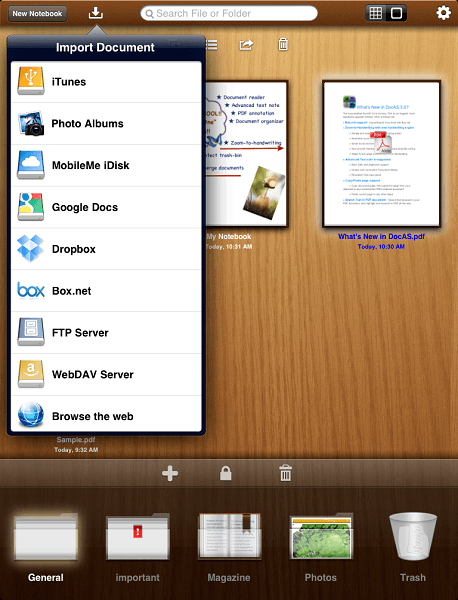
DocAS for iPad: another special PDF editor for iPad. It lets you annotate PDF files, take notes, record audio, and export PDF files. It supports importing/exporting from/to Dropbox, Box.net, iDisk, FTP, Google Docs, and WebDav services. This keeps your documents organized too.

There are many similarities between what these apps do. PDF annotation apps are not always cheap but they let you make changes to your documents on the go fast.

Which one of these PDF apps do you like the most (we use iAnnotate)?


**Disclaimer: Our articles may contain aff links. As an Amazon Associate we earn from qualifying purchases. Please read our disclaimer on how we fund this site.


Currently trending posts:

  • 5 Best PDF Readers for iPad You May Have Missed
  • 13 Ways To Get More Out of Dropbox on iPhone & iPad
  • 8 Awesome Text Editors for iPhone & iPad
  • 10 Best iPad Business Apps
  • 6 Top iPad Storage Apps
  • 8 Best e-Book Reader Apps for iPad

You may want to see:

  • 5 Audio Travel Guide Apps for iPhone
  • 7 Awesome Tough Cases for iPad 3 7 Awesome Tough Cases for iPad 3
  • 5 Dog Breed Apps for iPhone
  • 6 Awesome Twitter Apps for iPad 6 Awesome Twitter Apps for iPad

Tags: app listsiPad


Add your reaction

1 Comment

  1. shirlee says:
    October 12 at 9:28 am

    hi, fantastic list! have you tried writepdf as i am curious about it?

    Reply

Leave a Reply Cancel reply

Your email address will not be published. Required fields are marked *

  • Follow Us

    Facebooktwitterrssyoutube

  • Search & Subscribe

  • Trending Apps

    • Learn German on iPhone & iPad: 8 iOS Apps
    • 7 Streak Trackers for iPhone & iPad
    • 10 iPhone Apps for Home Remodeling Projects
    • 10 Awesome Treadmill Apps for iPhone
    • 5 Best Yoga Applications for iPad
    • 7 LiDAR Apps for iPhone & iPad
  • Current Visits:

    • 5 Must See iPhone Ring Lights
    • 4 iPhone Compatible Pepper Sprays for Self Defense
    • 3 Wearable iPhone Holders
  • Categories

    Admin AI Tools & Apps Apple Vision Pro Apps Apple Watch Accessories Commentary & Predictions Cool Finds DIY & Hacks Drones Events Giveaways Guest Posts Guides & Tools Home Automation Infographics iOS Security iPad accessories iPad Apps iPhone Accessories iPhone Apps iPhone Books iPhone Programming iPhone Thoughts iPhone Tips iPhotography Jailbreak Leaks Lists Mac Accessories News Reviews Smart Robots Uncategorized Videos Virtual Reality Wearables
  • Home
  • iPad Apps
  • How to: Annotate PDF Documents on iPad — 7 Apps
  • Tags

    3d printer 4k ai alexa Android app app enabled Apple apple watch app lists augmented reality bluetooth camera case Charger coding drone fitness GPS home automation iOS iPad iPhone iphone 5 keyboard modular mower power bank python rig robot robotic security camera smart Smartphone smartwatch Solar speaker stand stem top accessories vision pro wearable wifi wireless charger
  • Current visits

    • HENTIVIEW Second 4.7-Inch iPhone Screen for Rear Camera Selfies
    • Samsung NX9100D Bespoke App Smart Range with Interior Camera
    • Carson Universal: Smartphone Adapter for Telescopes
    • FINTIN V1 Mini-QWERTY Smartphone Keyboard for Visually Impaired People
    • Apollo Augmented Reality Clock
  • Search

  • Connect:

  •  

  • News
  • Partnerships
  • Our Reviews
  • Terms of Use
  • Privacy Policy
  • Takedown Requests
  • Support Us
  • RSS

© Copyright 2024 iPhoneness. EntropyGrid
iPhoneness is an independent website and has not been authorized, sponsored, or otherwise approved by Apple Inc. iPhone and iPhone 3G are among the trademarks or registered trademarks owned by or exclusively licensed to Apple Inc.