• Hot Stories
    • Top Apps
    • Accessories
    • Wearables
  • iOS Apps
  • Robots & Drones
    • Smart Robots
    • Drones
  • Home Automation
  • Support
    • Partners

iPhoneNess

Covering everything iPhone

    • Trending

      All time

    • 20 Best Calendar Apps for iPhone + Videos

      191 Comments

    • 10+ Best iPhone GPS Apps for Car Drivers

      77 Comments

    • Latest Stories

      What is new?

    • accrosoo F94 iPad Keyboard Case with 4-in-1 Hub

      December 4, 2025

    • LIFEHACKR Smart Water Bottle with MagSafe Mount

      December 4, 2025

    • Comments

      Most Recent

    • Cyrus on:

      Chargerito: Smallest Phone Charger?

    • chargerito on:

      Chargerito: Smallest Phone Charger?

  • Trends
    • 25+ iPhone Compatible Fitness Equipment
    • 30+ Flexible iPhone Mounts & Stands
    • 12 Stylish iPhone Purses & Bags
    • 15+ Awesome Solar Chargers for iPhone
    • 45+ Amazon Alexa-Enabled Smart Home Devices for iOS Users
    • 15 iPhone Garage Door Openers You Should See
    • 35+ Must See Augmented Reality Toys & Gadgets
    • 25+ Star Wars Gadgets & Gizmos for iPhone & iPad Fans
    • 40+ Awesome iPhone Compatible Robots for Kids
    • 15 iPhone Mounts & Accessories for GoPro Users
  • News
    • Guides
    • Cool Items
    • iPhone 5S
    • iWatch
    • iPad 5
    • iPad Mini
    • Kickstarter
  • iOS Apps
    • iPhone Apps
    • iPad Apps
    • Jailbreak
  • Tools
    • Alarm Clocks
    • Board Games
    • Calendars
    • Fitness Apps
    • GPS & Navigation
      • Outdoors
    • iOS Astronomy
  • Accessories
    • iPhone Add-ons
    • iPad Add-ons
  • Disclaimer
  • Contact

5 Best PDF Readers for iPad You May Have Missed

6
  • by Ci
  • in iPhone Apps
  • — 27 Dec

We have covered plenty of document and e-book reader apps for iPhone and iPad in the past. Apple iPad is a wonderful device to read PDF documents on. But there is a whole lot more you can do with your PDF documents if you install the right apps on your device. Wouldn’t it be nice if you could edit and add your notes to your PDF documents on your iPad? Maybe you just want to open large PDF files on your device. These 5 PDF applications could help you out:
💡Make your home smart with these Alexa enabled connected devices

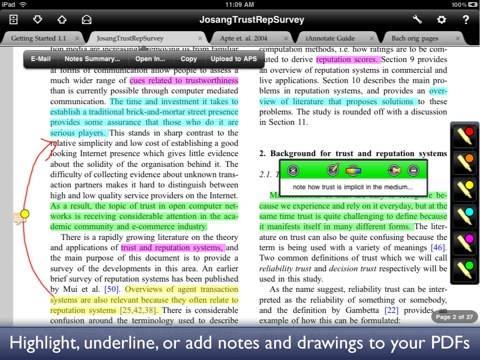
iAnnotate PDF: one of the most powerful PDF readers available for iPhone and iPad. It lets you add your notes and highlight parts of your PDF documents as you see fit. Supports tabbed PDF reading too.
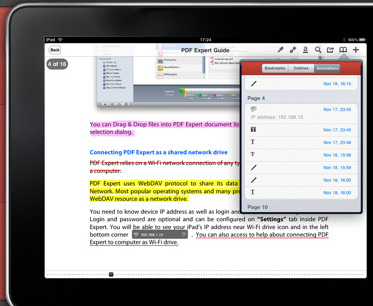
PDF Expert: an advanced PDF reader that lets you add your text notes, highlights, and diagrams to your documents. It is compatible with iDisk, Dropbox, Google Docs and other storage systems.
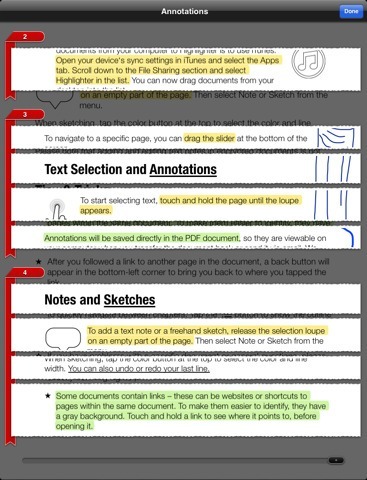
PDF Highlighter: an advanced PDF reader with a built-in web browser for embedded links in your PDF documents. Text notes and freehand sketches are supported too.
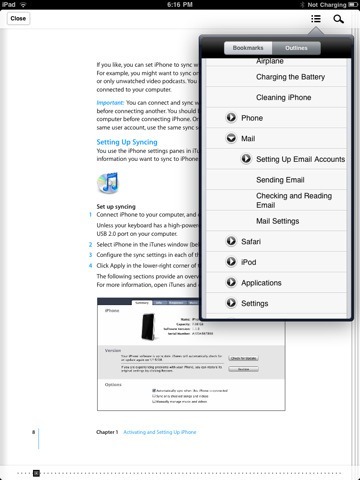
PDF HD – fast PDF reader: a very good solution if you intend to open large PDF files on your iPad. We all know how annoyingly slow PDF readers can be when handling super large files. This PDF reader can help.
💡Make your home smart with these Alexa enabled connected devices

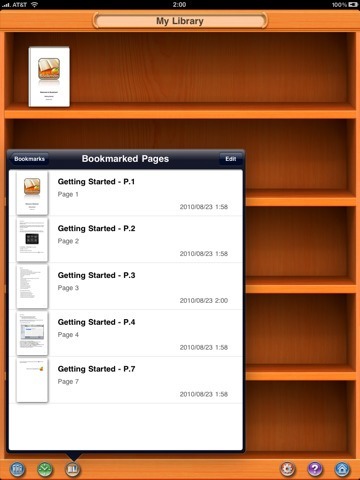
Bookman: this list would not be complete without a decent free PDF application. It is a very fast PDF app for iPad and supports CBR, CBZ, RAR, ZIP archived, PNG, JPG and BMP files too.

What’s your favorite PDF reader for iPad?

**Disclaimer: Our articles may contain aff links. As an Amazon Associate we earn from qualifying purchases. Please read our disclaimer on how we fund this site.


Currently trending posts:

  • 8 Best e-Book Reader Apps for iPad
  • How to: Annotate PDF Documents on iPad — 7 Apps
  • 10 Best Document Reader Apps for iPhone
  • 7 Cool Spreadsheet Apps for iPhone
  • 5 Ways To Sign Documents on iPhone and iPad
  • 10 Best iPad Business Apps

You may want to see:

  • 8 Awesome iPhone Apps for Road Trips 8 Awesome iPhone Apps for Road Trips
  • 7 Must See BJJ Apps for iPhone
  • 6 Interactive 3D Human Anatomy iPhone Apps
  • 3 iPhone Apps for Parkour Training

Tags: app lists


Add your reaction

6 Comments

  1. @ricardocruz says:
    December 27 at 12:39 pm

    I totally disagree with this " # best whatever apps" trend that has been flooding blogs for a while. What's the criteria, anyway? Actually, you have forgotten one very good PDF reader application: GoodReader (http://www.goodiware.com/goodreader.html).

    No, I don't work for them… I'm just a happy user 🙂

    Reply
    • Cyrus says:
      December 27 at 3:16 pm

      I want to assure you we did not miss GoodReader, ReaddleDocs and apps like that. I agree with you, Good Reader is a great app. We have it on so many other lists 🙂

      Reply
  2. Chris says:
    December 27 at 2:26 pm

    Goodreader is by far the best PDF Reader and must be mentioned. How could you miss it???

    Reply
    • Cyrus says:
      December 27 at 3:13 pm

      we did not miss it chris. Good Reader is more than just a PDF reader. We have listed it on our best document and e-book reader apps lists 🙂 Good Reader, ReaddleDocs, and all those types of apps have already been mentioned numerous times in our lists.

      Reply
      • @g0afr3ak says:
        December 31 at 7:39 am

        Ok, got your point! The title for this app list ist maybe a bit misleading, though, 'cause GoodReader, ReadleDocs ARE pdf apps, so they just have to be on such a list, imho. iAnnotate, for me the most useful apps in your list, also is much more that a simple PDF reader…

        Reply
        • Cyrus says:
          December 31 at 3:09 pm

          Yes. We have those apps you mentioned on so many lists, it is getting a bit repetitive. The whole reason we created this list was due to the feedback we got from our readers. Essentially, people were asking for "fast" PDF reader apps to handle large documents. But they had already seen the other apps we had listed.

          Changed the title a bit to fix that. You are right though. GoodReader and ReadleDocs are elite apps in this category 🙂

          Reply

Leave a Reply Cancel reply

Your email address will not be published. Required fields are marked *

  • Follow Us

    Facebooktwitterrssyoutube

  • Search & Subscribe

  • Trending Apps

    • 5 Must See Blood Sugar Trackers for iPhone & Apple Watch
    • 3 Light Pollution Apps for iPhone & iPad
    • 7 Fun Crossword Apps for iPhone
    • 5 iPhone Apps for Astrophotographers
    • 7 Must See Anxiety Trackers for iPhone & iPad
    • 6 iPhone Apps for Monitoring Online Data Usage
  • Current Visits:

    • 10+ Smart Tools & Gadgets for Makers & DIYers
    • 7 Must See Tactical Styluses for iPad & iPhone
    • 5 Must See Gun Controllers for iPhone
  • Categories

    Admin AI Tools & Apps Apple Vision Pro Apps Apple Watch Accessories Commentary & Predictions Cool Finds DIY & Hacks Drones Events Giveaways Guest Posts Guides & Tools Home Automation Infographics iOS Security iPad accessories iPad Apps iPhone Accessories iPhone Apps iPhone Books iPhone Programming iPhone Thoughts iPhone Tips iPhotography Jailbreak Leaks Lists Mac Accessories News Reviews Smart Robots Uncategorized Videos Virtual Reality Wearables
  • Home
  • iPhone Apps
  • 5 Best PDF Readers for iPad You May Have Missed
  • Tags

    3d printer 4k ai alexa Android app app enabled Apple apple watch app lists augmented reality bluetooth camera case Charger coding drone fitness GPS home automation iOS iPad iPhone iphone 5 keyboard modular mower power bank python rig robot robotic security camera smart Smartphone smartwatch Solar speaker stand stem top accessories vision pro wearable wifi wireless charger
  • Current visits

    • Bloxels for iOS: Build Video Games With This Kit
    • INNOCN 13A1F Portable iPhone 15 Monitor Announced
    • Bluetooth Typewriter to Keyboard Converter Kit
    • G.O.A.T Bluetooth Speaker for Pets
    • RESPIO Sleep Coach with App Tracking
  • Search

  • Connect:

  •  

  • News
  • Partnerships
  • Our Reviews
  • Terms of Use
  • Privacy Policy
  • Takedown Requests
  • Support Us
  • RSS

© Copyright 2024 iPhoneness. EntropyGrid
iPhoneness is an independent website and has not been authorized, sponsored, or otherwise approved by Apple Inc. iPhone and iPhone 3G are among the trademarks or registered trademarks owned by or exclusively licensed to Apple Inc.