• Hot Stories
    • Top Apps
    • Accessories
    • Wearables
  • iOS Apps
  • Robots & Drones
    • Smart Robots
    • Drones
  • Home Automation
  • Support
    • Partners

iPhoneNess

Covering everything iPhone

    • Trending

      All time

    • 20 Best Calendar Apps for iPhone + Videos

      191 Comments

    • 10+ Best iPhone GPS Apps for Car Drivers

      77 Comments

    • Latest Stories

      What is new?

    • SUPCASE iPhone Duo Case with 360 Rotating Stand

      October 16, 2026

    • YEOCASE Airbag E-Ink iPhone Case with Drop Protection

      October 16, 2026

    • Comments

      Most Recent

    • Cyrus on:

      Chargerito: Smallest Phone Charger?

    • chargerito on:

      Chargerito: Smallest Phone Charger?

  • Trends
    • 25+ iPhone Compatible Fitness Equipment
    • 30+ Flexible iPhone Mounts & Stands
    • 12 Stylish iPhone Purses & Bags
    • 15+ Awesome Solar Chargers for iPhone
    • 45+ Amazon Alexa-Enabled Smart Home Devices for iOS Users
    • 15 iPhone Garage Door Openers You Should See
    • 35+ Must See Augmented Reality Toys & Gadgets
    • 25+ Star Wars Gadgets & Gizmos for iPhone & iPad Fans
    • 40+ Awesome iPhone Compatible Robots for Kids
    • 15 iPhone Mounts & Accessories for GoPro Users
  • News
    • Guides
    • Cool Items
    • iPhone 5S
    • iWatch
    • iPad 5
    • iPad Mini
    • Kickstarter
  • iOS Apps
    • iPhone Apps
    • iPad Apps
    • Jailbreak
  • Tools
    • Alarm Clocks
    • Board Games
    • Calendars
    • Fitness Apps
    • GPS & Navigation
      • Outdoors
    • iOS Astronomy
  • Accessories
    • iPhone Add-ons
    • iPad Add-ons
  • Disclaimer
  • Contact

6 Handy FTP Applications for iPhone

2
  • by Ci
  • in iPhone Apps
  • — 19 Feb

Anybody who’s owned a website in her life has probably heard of FTP. Whether you want to upload files to a server or change your existing files, you are going to need an FTP connection. That’s the gist of it anyway without getting too technical. Most people make FTP connections on their desktop computer. But did you know that you can use your iPhone to get the job done as well? I admit that I still prefer using my desktop FTP program to manage my websites and upload files. However, if you must use your iPhone to make an FTP connection, here are 6 FTP iPhone applications you should look at:
More like this ➡️ here

iStorage: a complete file manager and storage system app for iPhone. Lets you access, view and edit your online files from iPhone/iPod Touch remotely.
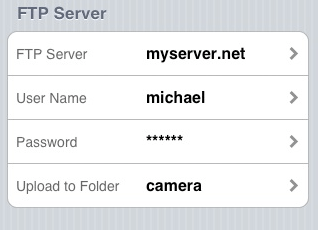
FTP Picture Upload: a handy app that lets you upload your latest photos to your website easily no matter where you are by taking advantage of the integrated FTP client in this app.
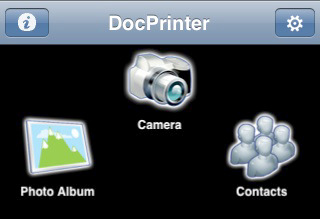
DocPrinter: a very useful app for transferring and printing files, documents, and Web Pages on your iPhone, from iDisk, WebDAV, Mac, PC or FTP site.
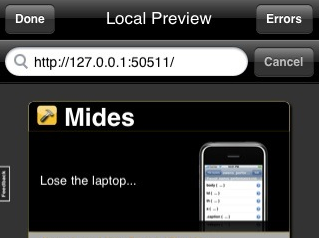
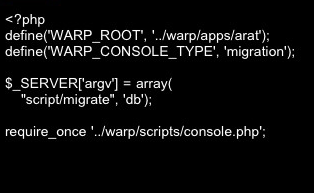
Mides IDE: Mides is a PHP IDE you can use to build PHP based web applications from your iPhone. To top it all, it comes with an integrated FTP client too.
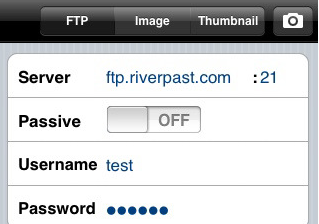
FTP Cam: another cool FTP app that lets you upload your photos to your website and keep your website fresh all all times.
30+ must see flexible iPhone mounts & stands

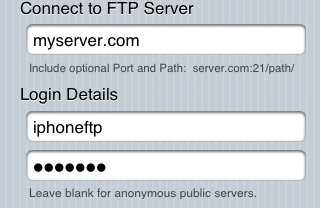
FTP On the Go: a straightforward FTP application that lets you upload and download from your FTP server. Lets you wirelessly share your files as well.

What’s been your experience with the above FTP apps for iPhone?

**Disclaimer: Our articles may contain aff links. As an Amazon Associate we earn from qualifying purchases. Please read our disclaimer on how we fund this site.


Currently trending posts:

  • 3 Cool SSH Applications for iPhone
  • 4 Quality SFTP Apps for iPhone
  • Top 6 Best iPhone Remoting Apps
  • 4 Must See iPhone Apps for Docker Users
  • 6 Must See MySQL Clients for iPhone
  • 3 Handy Telnet Apps for iPhone

You may want to see:

  • 5 Cool Shakespeare Apps for iPhone 5 Cool Shakespeare Apps for iPhone
  • 3 Cool Voice Recorders for iPod 3 Cool Voice Recorders for iPod
  • 5 Cool Clock Radio Systems for iPhone 5 Cool Clock Radio Systems for iPhone
  • 7 Premium Earphones for iPhone 7 Premium Earphones for iPhone

Tags: FTPtop lists


Add your reaction

2 Comments

  1. @appleblogz says:
    December 9 at 8:03 am

    I used FTP on the Go! quite a bit, great app..

    my downside is that since I was attacked a couple of time i use IP to allow or disallow and I guess the iPhone changes IP – ergo no login possible 🙁

    Other than that: awesome app!

    Reply
  2. ivan says:
    September 8 at 4:44 am

    Hello!

    We just launched an iPhone version of our code editor Codeanywhere.

    It’s free so please try it out and let us know what you think!
    https://codeanywhere.net/iphone-app

    Reply

Leave a Reply Cancel reply

Your email address will not be published. Required fields are marked *


  • Follow Us

    Facebooktwitterrssyoutube
  • Search & Subscribe

  • Trending Apps

    • 10 Awesome Paleo Diet Apps for iPhone
    • 6 iOS Apps To Unlock, Shut Down Your Mac
    • Learn C++ Programming with These iOS Apps
    • 7 Diabetes Tracking Apps for iPhone & iPad
    • 5 Fake GPS Apps for iPhone
    • 6 Powerful Cryptocurrency Charts iPhone Apps for Altcoin Investors
  • Categories

    Admin AI Tools & Apps Apple Vision Pro Apps Apple Watch Accessories Commentary & Predictions Cool Finds DIY & Hacks Drones Events Giveaways Guest Posts Guides & Tools Home Automation Infographics iOS Security iPad accessories iPad Apps iPhone Accessories iPhone Apps iPhone Books iPhone Programming iPhone Thoughts iPhone Tips iPhotography Jailbreak Leaks Lists Mac Accessories News Reviews Smart Robots Uncategorized Videos Virtual Reality Wearables
  • Home
  • iPhone Apps
  • 6 Handy FTP Applications for iPhone
        • News
        • Partnerships
        • Our Reviews
        • Terms of Use
        • Privacy Policy
        • Takedown Requests
        • Support Us
        • RSS

        © Copyright 2026 iPhoneness. EntropyGrid
        iPhoneness is an independent website and has not been authorized, sponsored, or otherwise approved by Apple Inc. iPhone and iPhone 3G are among the trademarks or registered trademarks owned by or exclusively licensed to Apple Inc.