• Hot Stories
    • Top Apps
    • Accessories
    • Wearables
  • iOS Apps
  • Robots & Drones
    • Smart Robots
    • Drones
  • Home Automation
  • Support
    • Partners

iPhoneNess

Covering everything iPhone

    • Trending

      All time

    • 20 Best Calendar Apps for iPhone + Videos

      191 Comments

    • 10+ Best iPhone GPS Apps for Car Drivers

      77 Comments

    • Latest Stories

      What is new?

    • accrosoo F94 iPad Keyboard Case with 4-in-1 Hub

      December 4, 2025

    • LIFEHACKR Smart Water Bottle with MagSafe Mount

      December 4, 2025

    • Comments

      Most Recent

    • Cyrus on:

      Chargerito: Smallest Phone Charger?

    • chargerito on:

      Chargerito: Smallest Phone Charger?

  • Trends
    • 25+ iPhone Compatible Fitness Equipment
    • 30+ Flexible iPhone Mounts & Stands
    • 12 Stylish iPhone Purses & Bags
    • 15+ Awesome Solar Chargers for iPhone
    • 45+ Amazon Alexa-Enabled Smart Home Devices for iOS Users
    • 15 iPhone Garage Door Openers You Should See
    • 35+ Must See Augmented Reality Toys & Gadgets
    • 25+ Star Wars Gadgets & Gizmos for iPhone & iPad Fans
    • 40+ Awesome iPhone Compatible Robots for Kids
    • 15 iPhone Mounts & Accessories for GoPro Users
  • News
    • Guides
    • Cool Items
    • iPhone 5S
    • iWatch
    • iPad 5
    • iPad Mini
    • Kickstarter
  • iOS Apps
    • iPhone Apps
    • iPad Apps
    • Jailbreak
  • Tools
    • Alarm Clocks
    • Board Games
    • Calendars
    • Fitness Apps
    • GPS & Navigation
      • Outdoors
    • iOS Astronomy
  • Accessories
    • iPhone Add-ons
    • iPad Add-ons
  • Disclaimer
  • Contact

Parallels Access: Use PC / Mac Apps on iPad

0
  • by Ci
  • in News
  • — 28 Aug

Introducing Parallels Access

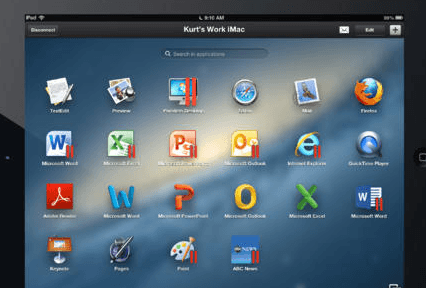
Have you ever wanted to access your desktop PC applications on your iPad? No matter how great your tablet, it is not designed to run Windows or Mac applications. Parallels Access is a handy app that lets you use all your applications from your iPad. You can access your apps from anywhere. Whether you want to run business applications or watch videos, Parallels Access has you covered. The app supports iPad gestures when using your Mac and Windows applications.
Trending iPhone & iPad compatible gadgets:
  • 10+ iPhone-Compatible Dog Feeders [App Enabled]

parallels access

Parallels Access works as long as you have an Internet connection. You can scroll, switch between apps, select/drag, and copy/paste like a pro. This app offers a full screen mode for apps. It can connect to as many computers as you need. You can get started for free but in order to keep all the neat features and get the most out of this app, you will have to part ways with $79.99 (each year). Don’t forget to install the Parallels Access Desktop Agent on your computer before getting started.

[Download]

**Disclaimer: Our articles may contain aff links. As an Amazon Associate we earn from qualifying purchases. Please read our disclaimer on how we fund this site.


Currently trending posts:

  • Top 6 Best iPhone Remoting Apps
  • Parallels Access Now Universal, Garmin víago GPS App
  • 6 Top iPad Storage Apps
  • 6 iOS Apps To Unlock, Shut Down Your Mac
  • 7 Best Chess Apps for iPad
  • 3 Must See SSH Apps for Vision Pro

You may want to see:

  • Find a Doctor Using Your iPhone: 5 Apps
  • Night Sky 2: Beautiful Astronomy App for iPhone
  • WAINLUX K8 App Controlled Laser Engraver with Smart Camera
  • Stanford Researchers Develop App To Treat & Track Autism

Tags: appparallelsremoting


Add your reaction

Leave a Reply Cancel reply

Your email address will not be published. Required fields are marked *

  • Follow Us

    Facebooktwitterrssyoutube

  • Search & Subscribe

  • Trending Apps

    • 6 Apple Watch Apps for Heart Rate Zones
    • 5 Decent Download Managers for iPhone & iPad
    • Yoga & Stretching Apps for Runners: 7 Apps
    • 6 Awesome Fitness Bundles for iOS
    • 5 Must See Blood Sugar Trackers for iPhone & Apple Watch
    • 15+ Best iPhone Soccer Games & Football Apps
  • Current Visits:

    • 5 Must See Solar Tables
    • 5 Neat Headrest Mounts for iPad
    • 5 Awesome Telepresence & Robotic Platforms for iOS
  • Categories

    Admin AI Tools & Apps Apple Vision Pro Apps Apple Watch Accessories Commentary & Predictions Cool Finds DIY & Hacks Drones Events Giveaways Guest Posts Guides & Tools Home Automation Infographics iOS Security iPad accessories iPad Apps iPhone Accessories iPhone Apps iPhone Books iPhone Programming iPhone Thoughts iPhone Tips iPhotography Jailbreak Leaks Lists Mac Accessories News Reviews Smart Robots Uncategorized Videos Virtual Reality Wearables
  • Home
  • News
  • Parallels Access: Use PC / Mac Apps on iPad
  • Tags

    3d printer 4k ai alexa Android app app enabled Apple apple watch app lists augmented reality bluetooth camera case Charger coding drone fitness GPS home automation iOS iPad iPhone iphone 5 keyboard modular mower power bank python rig robot robotic security camera smart Smartphone smartwatch Solar speaker stand stem top accessories vision pro wearable wifi wireless charger
  • Current visits

    • Max:bot DIY Programmable Robot for Kids 8+
    • PINEWORLD L5 WiFi & Bluetooth Smart Door Lock
    • Somat Smart Dishwasher Device with App Control
    • HotDive: Smart Diving Case for iPhone
    • Vibe 55″ App Smart Interactive Whiteboard
  • Search

  • Connect:

  •  

  • News
  • Partnerships
  • Our Reviews
  • Terms of Use
  • Privacy Policy
  • Takedown Requests
  • Support Us
  • RSS

© Copyright 2024 iPhoneness. EntropyGrid
iPhoneness is an independent website and has not been authorized, sponsored, or otherwise approved by Apple Inc. iPhone and iPhone 3G are among the trademarks or registered trademarks owned by or exclusively licensed to Apple Inc.